Release 5.46
New in this release
Webhooks
Webhooks in this release are expanded and easier to use. IDaaS now supports a broader event catalog across user lifecycle, authentication outcomes, credentials, passkeys, tokens, grids, and magic links, with additional detailed information for each event. Webhook delivery now follows a standard HTTP message signing model (RFC 9421) to simplify verification in downstream services, and webhook administration has been improved with clearer configuration metadata (including required webhook names) and more flexible testing options, such as overriding the callback URL during test calls.
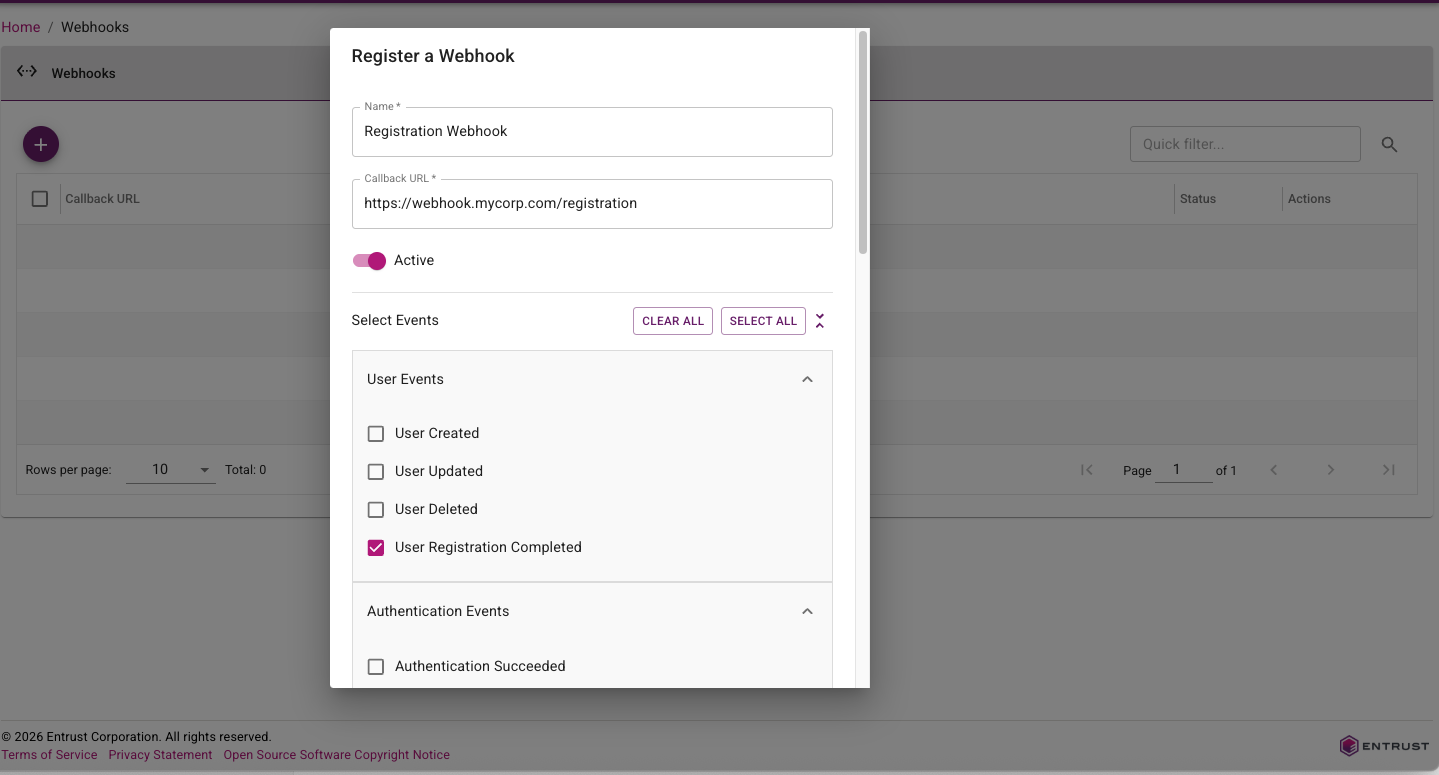
For more information, see the Webhook customer use cases guide.
Documentation Portal
This release of IDaaS introduces a new documentation portal that combines admin guidance, developer resources, and release notes in one place.
The new documentation portal includes the following features:
- Improved searching.
- LLM-friendly content export support for AI-assisted knowledge workflows.
For portal access and navigation, see the IDaaS documentation portal home.
Identity Enterprise Agent Migration Enhancements
The Identity Enterprise (formerly IdentityGuard) Agent in the Enterprise Service Gateway has been enhanced to support progressive migration of customers from Identity Enterprise to IDaaS. When handling authentication requests from an Identity Enterprise client, the agent first tries to forward the request to IDaaS. If the user does not exist in IDaaS, the agent will then forward the request to Identity Enterprise. This allows a customer to migrate their users from Identity Enterprise to IDaaS in stages without forcing immediate client-side changes across all legacy integrations.
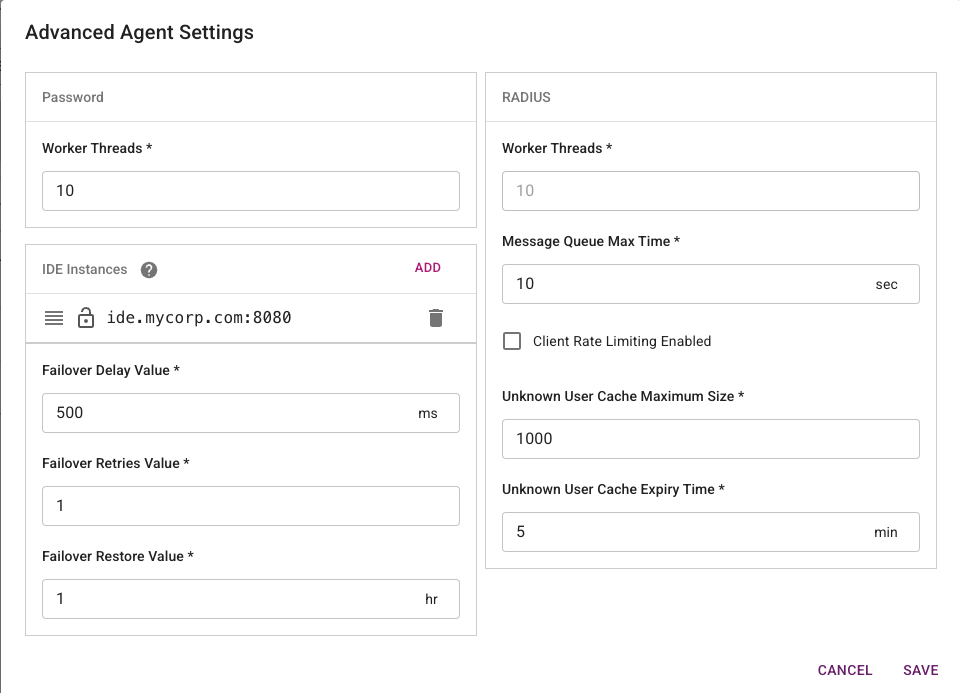
For configuration and routing behavior details, see Configuring an Identity Enterprise Agent.
Passkey Attestation
This release introduces passkey attestation enhancements to improve trust during passkey registration and lifecycle management. IDaaS now captures and evaluates attestation-related registration details so administrators can better validate authenticator provenance and strengthen phishing-resistant authentication policies.
In addition, administrators now have an option to list passkeys, making it easier to review registered passkeys, identify stale or duplicate credentials, and support user troubleshooting and cleanup workflows. Together, these improvements help security teams make stronger authenticator trust decisions while giving operations teams better passkey inventory visibility and lifecycle control.
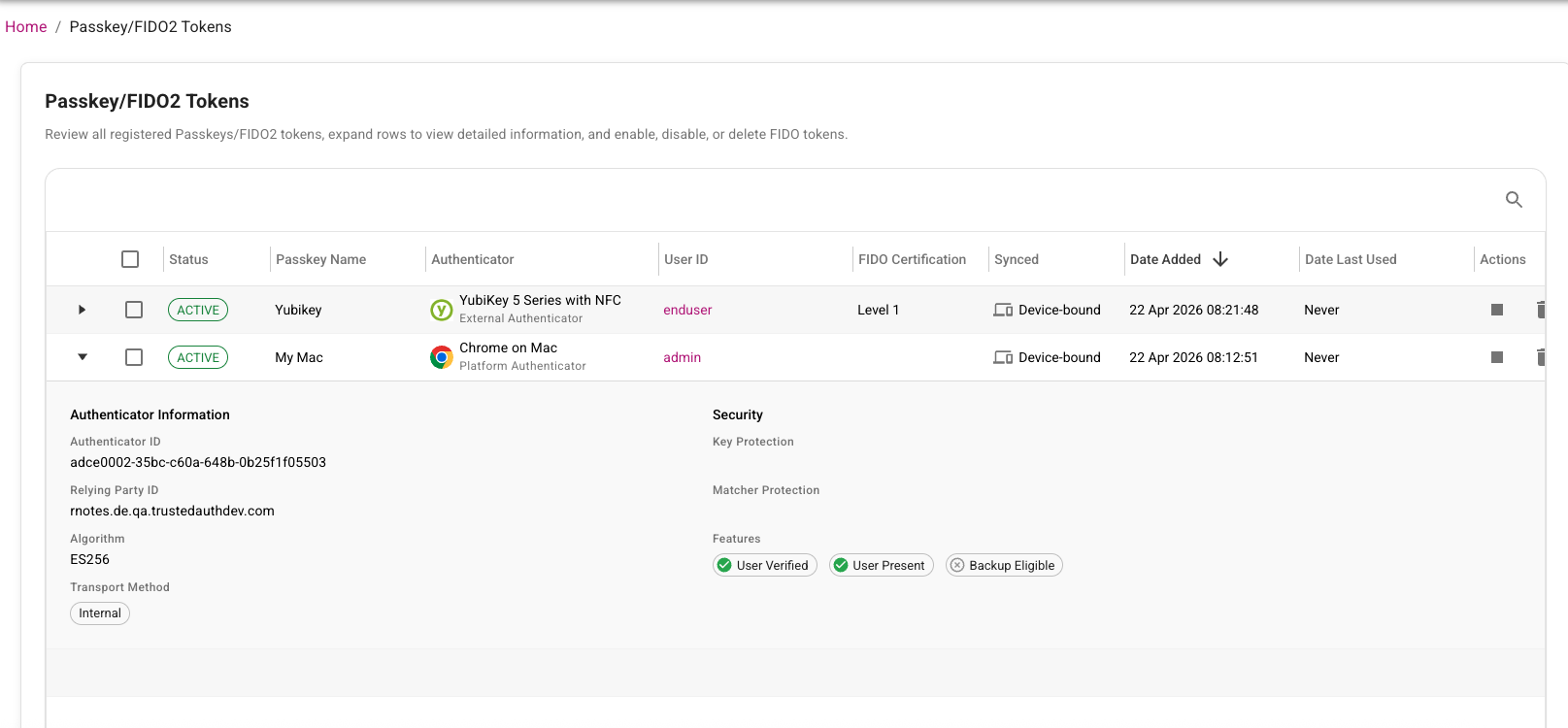
For solution overview and platform context, see Passkey basics and IDaaS Passkey/FIDO2 authenticator management.
User External ID Enhancements
User External ID enhancements make it easier for customers to link external account information to the corresponding IDaaS account by mapping and persisting customer-managed user identifiers in IDaaS. External ID values can be assigned through directory sync, inbound IdP claims, the Administration API, bulk operations, or SCIM provisioning. External IDs can be included in SAML attributes or OIDC claims and be used for API-based lookups.

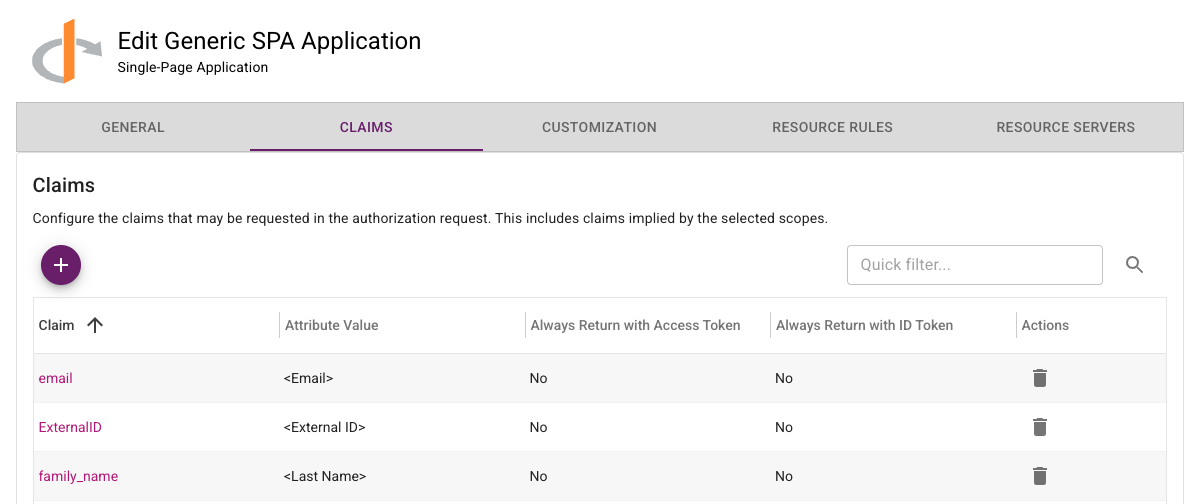
For configuration details and integration examples, see Configure external ID for users.
Magic Link Enhancements
This release adds a new setting to automatically send a magic link when a new user is created. The link can take the user directly to IDaaS to complete verification and initial registration, reducing onboarding friction and speeding time to first sign-in.
The Magic Link redirect URL validation is now more flexible but still preserves application safety. Previously, the requested redirect URL had to exactly match an allowed URL. Now, IDaaS validates the base redirect URL and ignores differences in query parameters. This lets clients include route or state parameters so users can return to a specific page in the same application after completing the magic link flow.
For customer scenarios and implementation patterns, see Magic links solution guide.
Portal Enhancements
The following changes have been made to the Administration portal to improve usability, so administrators can complete common setup and governance tasks faster with fewer navigation and context-switching steps:
-
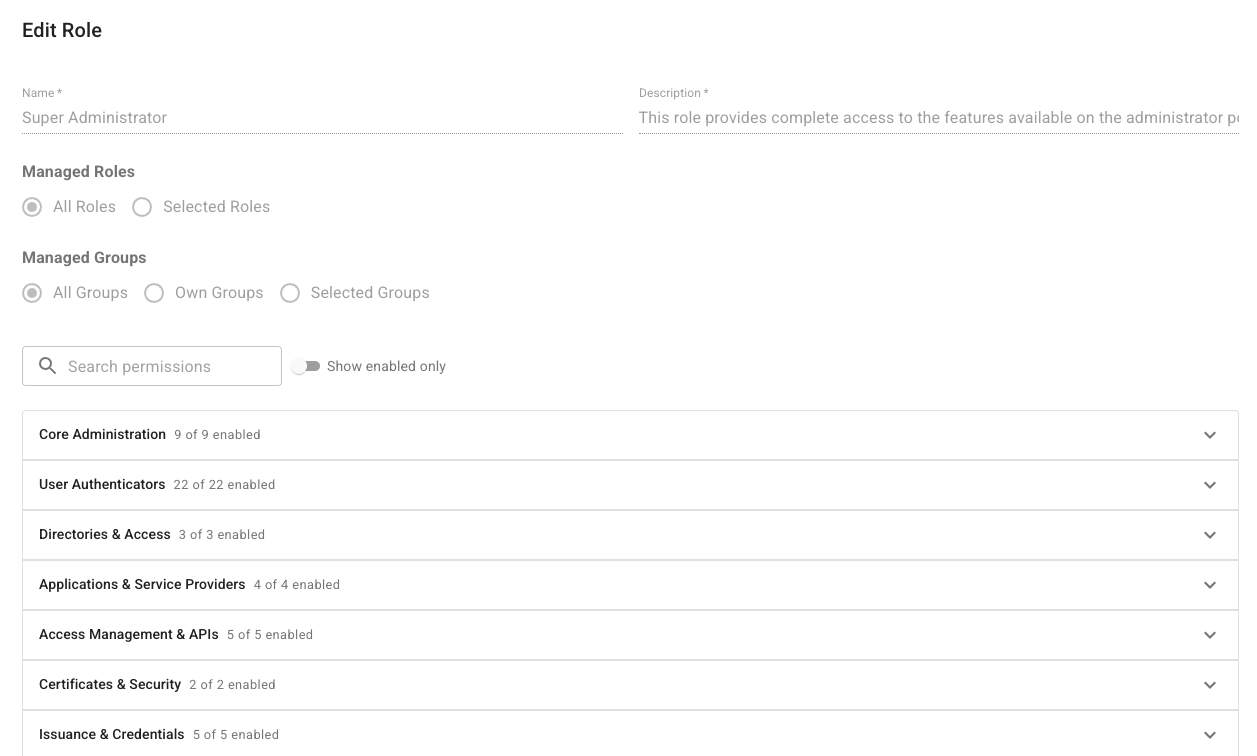
The administrator Add Role page has been updated to improve usability. See Create, assign, and manage roles.
-
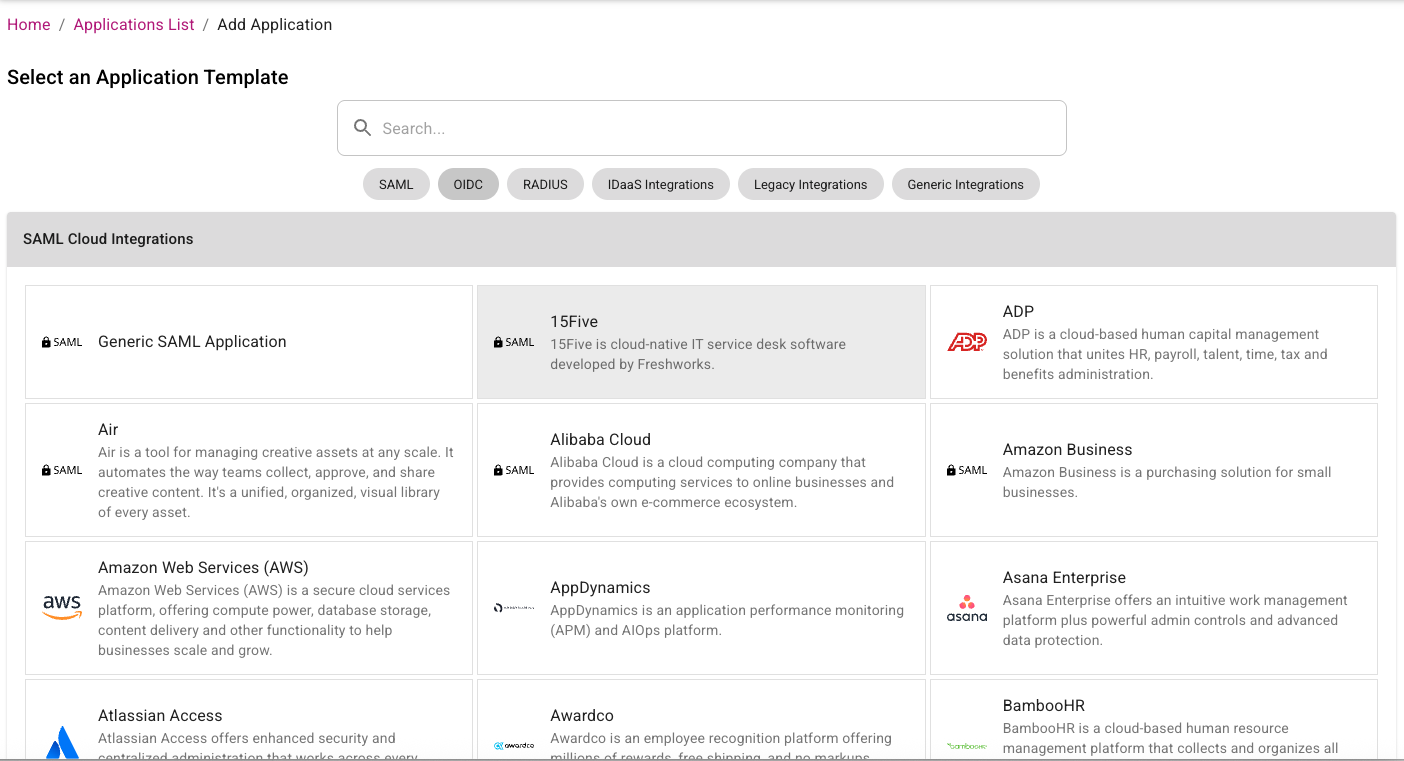
The Add Application page has been redesigned. Applications are now categorized by type and it is easier to select which type of application the administrator wants to view. See Manage applications.
-
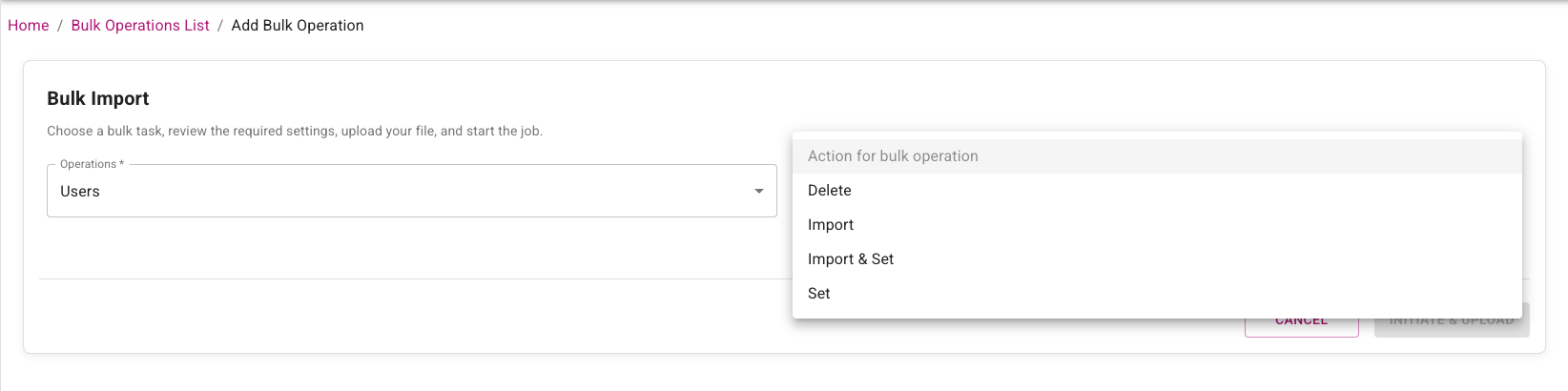
The Add Bulk Operations page has been modified so that the administrator selects the type of entity first and then the action. Previously the action was selected first. See Manage bulk operations.
-
The allowed resolution for custom logos has been increased from 450x150 to 900x300. See Customize account appearance and language.
-
Editing Links in the Message of the Day has been fixed. See Customize account appearance and language.
Content Security Policy (CSP) Changes
The Content Security Policy used by IDaaS has been made stricter in this release. The following changes have been made:
- Remove Google Analytics and font endpoints.
- Use specific S3 bucket endpoints instead of broader AWS endpoints.
Fixed or changed in this release
- The Verify User action required the Add permission for the authenticator being used. This is no longer required. (42124)
- Change to how Google Authenticators in the activating state are treated during registration. (42067)
- Named password UI fixes: reset-password named password not saved until refresh; named password cleanup; and small-window layout fix for named password group policy. (42025, 41810, 41714)
- Risk Factor source IP address in resource rules causing Create OTP Auth API failure. (42030)
- For OIDC applications, initiate Login URL should not be mandatory. (41991)
- SIEM customization tab logo not saving. (41983)
- Directory configuration Group Filter not honored in AD LDS. (41974)
- Changing tabs in the application UI can overwrite changes. (41936)
- Audit searches with empty subjectName should ignore the search attribute. (41917)
- Admin portal error after user password authentication. (41888)
- Generic 500 error on password reset URL. (41873)
- Bulk import sample CSV had duplicate security ID in audit. (41856)
- Validate search parameters for assigning preferred OTP provider to tenants/accounts. (41798)
- Named password flow and audit validation updates: disable named passwords for system-defined auth flows; enforce namedPasswordId check in Admin API password reset; and use named password UUID in group policy audit updates. (41797, 41640, 41163)
- Password reset email from admin portal showed “default” in email body. (41763)
- Alternative OTP delivery methods not working at portal login when non-default method selected in user profile. (41769)
- Magic link login invalid_token error. (41755)
- SCIM: add user as provisioned user if user already exists. (41734)
- Named password audit/log consistency updates for bulk password reset and SAML forgot password, plus password-only group policy reset audit behavior. (41730, 41729, 41722, 41719)
- Trimmed challenge response through ESG IdentityGuard Agent. (41689)
- Default group policy category on password when present. (41620)
- Service Provider tenant management role not working if no site role assigned. (41514)
- Null Pointer Exception (NPE) during TransactionDetails check. (41452)
- Email notification did not specify which password was changed. (41333)
- SCIM provisioning failure when token expired. (41305)
- Application description could not be set to blank. (41218)
- SAML application max age disable behavior for -1 updated with day-based time handling. (41072)
- SP auditor role should be able to view tenant usage details dialog. (41065)
- Allow upload of WeChat service account QR code. (41049)
- Token push verify user cancel audit permission update. (40818)
- Verify user grid for specified-one missing userId in audit. (40562)
- Previous passwords cannot be reused: inconsistent behavior when resetting password with current password. (30638)
Changes to Identity as a Service (IDaaS) APIs
Authentication API
New operations
- None.
Removed operations
- None.
Changed operations
- None.
Changed models
FIDORegisterChallenge- Added:
attestation(string) - Attestation preference for passkey/FIDO2 registration. Determines how much information about the authenticator (security key/passkey) is shared during registration. NONE: No authenticator details shared (recommended for privacy). INDIRECT: Basic information shared in a privacy-preserving way (balanced approach). DIRECT: Full authenticator details shared (use when you need to verify specific device models).
- Added:
FIDORegisterResponse- Added:
transports(array<string>) - The transport methods used during registration (for example, 'usb', 'nfc', 'ble', 'internal'). Used to determine authenticator capabilities.
- Added:
FIDOToken- Added:
aaguid(string) - The AAGUID of the authenticator that created this FIDO token. - Added:
aaguidVerified(boolean) - Indicates whether the AAGUID reported by the authenticator was cryptographically verified via a full certificate chain against the FIDO MDS trust anchors. True only for DIRECT attestation; false for INDIRECT (cert chain not verified); null for NONE (no attestation collected). - Added:
algorithm(string) - The signature algorithm of the authenticator that created this FIDO token. - Added:
attestationFormat(string) - Attestation format of the authenticator that created this FIDO token. - Added:
attestedData(boolean) - Indicates if this FIDO token contains attested data. - Added:
authenticatorModel(string) - The authenticator model of the authenticator that created this FIDO token. - Added:
backupEligible(boolean) - Indicates if this FIDO token is eligible for backup. - Added:
backupStatus(boolean) - Indicates if this FIDO token is currently backed up. - Added:
icon(string) - The icon of the authenticator that created this FIDO token. - Added:
userPresent(boolean) - Indicates if the user was present during the registration or authentication ceremony that created or last used this FIDO token. - Added:
userVerified(boolean) - Indicates if the user was verified during the registration or authentication ceremony that created or last used this FIDO token.
- Added:
GridChallenge- Added:
cellAlphabets(string) - The cellAlphabets value specifies the characters that are valid for the cells in the grid challenge. - Required added:
cellAlphabets.
- Added:
UserAuthenticatorLockoutStatus- Added:
locked(boolean) - Determines if this authenticator is currently locked out.
- Added:
Administration API
New operations
GET /api/web/v1/async/tokenspaged/{id}/assigned/result (assignedTokenPageAsyncResultUsingGET)- Get the result of an asynchronous list assigned tokens operation.GET /api/web/v1/async/tokenspaged/{id}/assigned/status (assignedTokenPageAsyncStatusUsingGET)- Get the status of an asynchronous list assigned tokens operation.GET /api/web/v1/async/tokenspaged/{id}/unassigned/result (unassignedTokenPageAsyncResultUsingGET)- Get the result of an asynchronous list unassigned tokens operation.GET /api/web/v1/async/tokenspaged/{id}/unassigned/status (unassignedTokenPageAsyncStatusUsingGET)- Get the status of an asynchronous list unassigned tokens operation.GET /api/web/v2/async/gridspaged/{id}/assigned/result (assignedGridsPageAsyncResultUsingGET)- Get the result of an asynchronous list assigned grids operation.GET /api/web/v2/async/gridspaged/{id}/assigned/status (assignedGridsPageAsyncStatusUsingGET)- Get the status of an asynchronous list assigned grids operation.GET /api/web/v2/async/gridspaged/{id}/unassigned/result (unassignedGridsPageAsyncResultUsingGET)- Get the result of an asynchronous list unassigned grids operation.GET /api/web/v2/async/gridspaged/{id}/unassigned/status (unassignedGridsPageAsyncStatusUsingGET)- Get the status of an asynchronous list unassigned grids operation.GET /api/web/v4/async/userspaged/{id}/result (usersPagedAsyncResultUsingGET)- Get the result of an asynchronous list users operation.GET /api/web/v4/async/userspaged/{id}/status (usersPagedAsyncStatusUsingGET)- Get the status of an asynchronous list users operation.POST /api/web/v1/async/tokenspaged/assigned (assignedTokenPageAsyncUsingPOST)- Lists a page of assigned tokens asynchronously.POST /api/web/v1/async/tokenspaged/unassigned (unassignedTokenPageAsyncUsingPOST)- Lists a page of unassigned hardware tokens asynchronously.POST /api/web/v1/fidotokenspaged (getFIDOTokensPagedUsingPOST)- Get FIDO tokens (paginated).POST /api/web/v2/async/gridspaged/assigned (assignedGridsPageAsyncUsingPOST)- Lists a page of assigned grids asynchronously.POST /api/web/v2/async/gridspaged/unassigned (unassignedGridsPageAsyncUsingPOST)- Lists a page of unassigned grids asynchronously.POST /api/web/v4/async/userspaged (usersPagedAsyncUsingPOST)- Lists a page of users asynchronously.
Removed operations
POST /api/web/v4/tenants (createTenantUsingPOST)
Changed operations
POST /api/web/v1/webhooks/test/{id} (testWebhookUsingPOST)- Request body: A request body was added.
Changed models
FIDOAuthenticatorSettings- Added:
attestation(string) - Attestation preference for passkey/FIDO2 registration. Determines how much information about the authenticator (security key/passkey) is shared during registration. NONE: No authenticator details shared (recommended for privacy). INDIRECT: Basic information shared in a privacy-preserving way (balanced approach). DIRECT: Full authenticator details shared (use when you need to verify specific device models).
- Added:
FIDOAuthenticatorSettingsParms- Added:
attestation(string) - Attestation preference for passkey/FIDO2 registration. Determines how much information about the authenticator (security key/passkey) is shared during registration. NONE: No authenticator details shared (recommended for privacy). INDIRECT: Basic information shared in a privacy-preserving way (balanced approach). DIRECT: Full authenticator details shared (use when you need to verify specific device models).
- Added:
FIDORegisterChallenge- Added:
attestation(string) - Attestation preference for passkey/FIDO2 registration. Determines how much information about the authenticator (security key/passkey) is shared during registration. NONE: No authenticator details shared (recommended for privacy). INDIRECT: Basic information shared in a privacy-preserving way (balanced approach). DIRECT: Full authenticator details shared (use when you need to verify specific device models).
- Added:
FIDORegisterResponse- Added:
transports(array<string>) - The transport methods used during registration (e.g., 'usb', 'nfc', 'ble', 'internal'). Used to determine authenticator capabilities.
- Added:
FIDOToken- Added:
aaguid(string) - The AAGUID of the authenticator that created this FIDO token. - Added:
aaguidVerified(boolean) - Indicates whether the AAGUID reported by the authenticator was cryptographically verified via a full certificate chain against the FIDO MDS trust anchors. True only for DIRECT attestation; false for INDIRECT (cert chain not verified); null for NONE (no attestation collected). - Added:
algorithm(string) - The signature algorithm of the authenticator that created this FIDO token. - Added:
attestationFormat(string) - Attestation format of the authenticator that created this FIDO token. - Added:
attestedData(boolean) - Indicates if this FIDO token contains attested data. - Added:
authenticatorModel(string) - The authenticator model of the authenticator that created this FIDO token. - Added:
backupEligible(boolean) - Indicates if this FIDO token is eligible for backup. - Added:
backupStatus(boolean) - Indicates if this FIDO token is currently backed up. - Added:
icon(string) - The icon of the authenticator that created this FIDO token. - Added:
userPresent(boolean) - Indicates if the user was present during the registration or authentication ceremony that created or last used this FIDO token. - Added:
userVerified(boolean) - Indicates if the user was verified during the registration or authentication ceremony that created or last used this FIDO token.
- Added:
OTPAuthenticatorSettings- Added:
otpWeChatDefaultDeliveryAttribute(string) - Id of the default WeChat OTP delivery attribute. - Removed:
otpWechatDefaultDeliveryAttribute(string) - Id of the default Wechat OTP delivery attribute.
- Added:
PasswordResetSettings- Added:
namedPasswordName(string) - The name of the password.
- Added:
User- Added:
userPasswordDetails(array<UserPasswordDetails>) - A list of the user password details. - Flag changed:
passwordCompromiseddeprecated: false -> true. - Flag changed:
passwordExpirationTimedeprecated: false -> true.
- Added:
UserAuthenticatorLockoutStatus- Added:
locked(boolean) - Determines if this authenticator is currently locked out.
- Added:
Webhook- Added:
name(string) - Descriptive name for the webhook to help identify its purpose.
- Added:
WebhookEvent- Enum changed on
type: addeduser.created,user.updated,user.deleted,user.registration.completed,authentication.succeeded,authentication.failed,password.updated,magiclink.email.sent,grid.created,grid.email.sent,grid.password.email.sent,passkey.created,passkey.updated,passkey.deleted,kba.question.created,token.created,token.activated,token.activated.online,token.seed.rotated,hardware.token.assigned,face.biometric.created,credential.create,credential.update,credential.delete,credential.print.
- Enum changed on
WebhookParms- Added:
name(string) - Descriptive name for the webhook to help identify its purpose. - Changed:
enabled- Improved description. Indicates whether the webhook is active and will receive event notifications. Disabled webhooks will not receive any events. - Required added:
name.
- Added:
Supported TLS Ciphers
IDaaS supports the following TLS Ciphers:
TLSv1.3:
- TLS_AES_128_GCM_SHA256
- TLS_AES_256_GCM_SHA384
- TLS_CHACHA20_POLY1305_SHA256
TLSv1.2:
- ECDHE-RSA-AES128-GCM-SHA256
- ECDHE-RSA-AES256-GCM-SHA384
- ECDHE-RSA-CHACHA20-POLY1305
Enterprise Service Gateway (ESG) Deprecation
Entrust supports only the last four releases of the Enterprise Service Gateway (the current version 5.46 and the three previous releases 5.43, 5.44, and 5.45). Entrust recommends that customers always upgrade their Enterprise Service Gateway to the latest release because each release contains security updates to the Enterprise Service Gateway Operating System.
NOTE: In an upcoming release, changes are planned that will break versions of ESG older than 5.33.
In-place upgrade of the ESG is only supported for versions 5.33 or later. Versions of ESG older than 5.33 are no longer supported. To upgrade versions of ESGs older than 5.33 to the new version, use the following procedure:
- Download the latest Gateway OVA or Hyper-V file from IDaaS and install on a new VM instance.
- Add a new Gateway instance to the existing Gateway in IDaaS.
- Register the new Gateway instance with IDaaS.
- Disable the old Gateway instance.
- Repeat these steps to replace all the Gateway instances that use older versions of the ESG.
Once the upgrade is complete, the Gateway instances corresponding to the old ESGs can be deleted from IDaaS and the VMs for those ESG instances can also be deleted.
Browser Deprecation
Microsoft no longer supports the Internet Explorer 11 and Microsoft Edge Legacy browsers. Identity as a Service no longer supports these browsers.