76 posts tagged with "Release"

IDaaS Release Notes

View All Tags

Release 5.47.1

· One min read

Known issues​

Enterprise Service Gateway upgrades to version 5.47 can fail because of conflicting packages. Before retrying the upgrade, follow the Gateway upgrade workaround.

After upgrading an Enterprise Service Gateway to version 5.47, scheduled Active Directory synchronization can fail with LDAP error 50 (insufficientAccessRights). Delta sync is now the default for scheduled synchronization and requires additional Active Directory replication permissions. Grant the required permissions to the Directory Sync Agent service account as described in Delta synchronization. (43587)

Fixed or changed in this release​

  • Restored the access token typ header from at+JWT to JWT for tokens without authentication claims. The change to at+JWT in release 5.47 broke compatibility with clients that expected JWT. Tokens with authentication claims remain at+JWT. (43506)
  • Fixed push authentication failures when location details are unavailable for users whose phone is located in Vietnam and China. (43510)

Release 5.47

· 20 min read

New in this release​

This release introduces updates across authentication customization, identity verification, OIDC, passkeys, workload identities, directory sync performance, and portal usability.

Customizing the user authentication experience​

This release introduces expanded controls to tailor the end-user authentication experience across branding, layout, messaging, language, and per-application sign-in behavior:

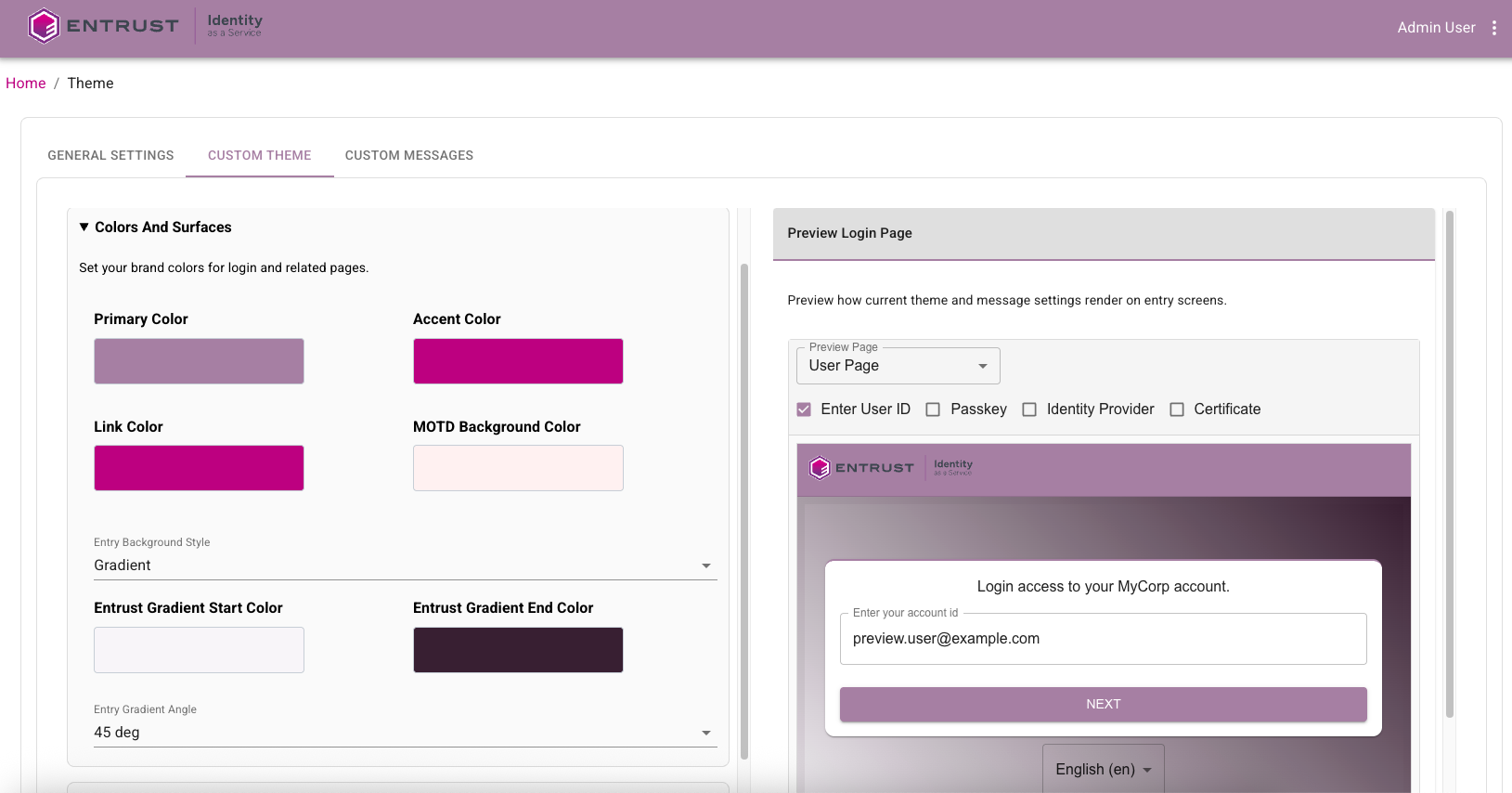
  • Brand and theme controls. Customize company logo and favicon, brand colors (including gradients), entry-page typography, and browser tab title for login-related pages.
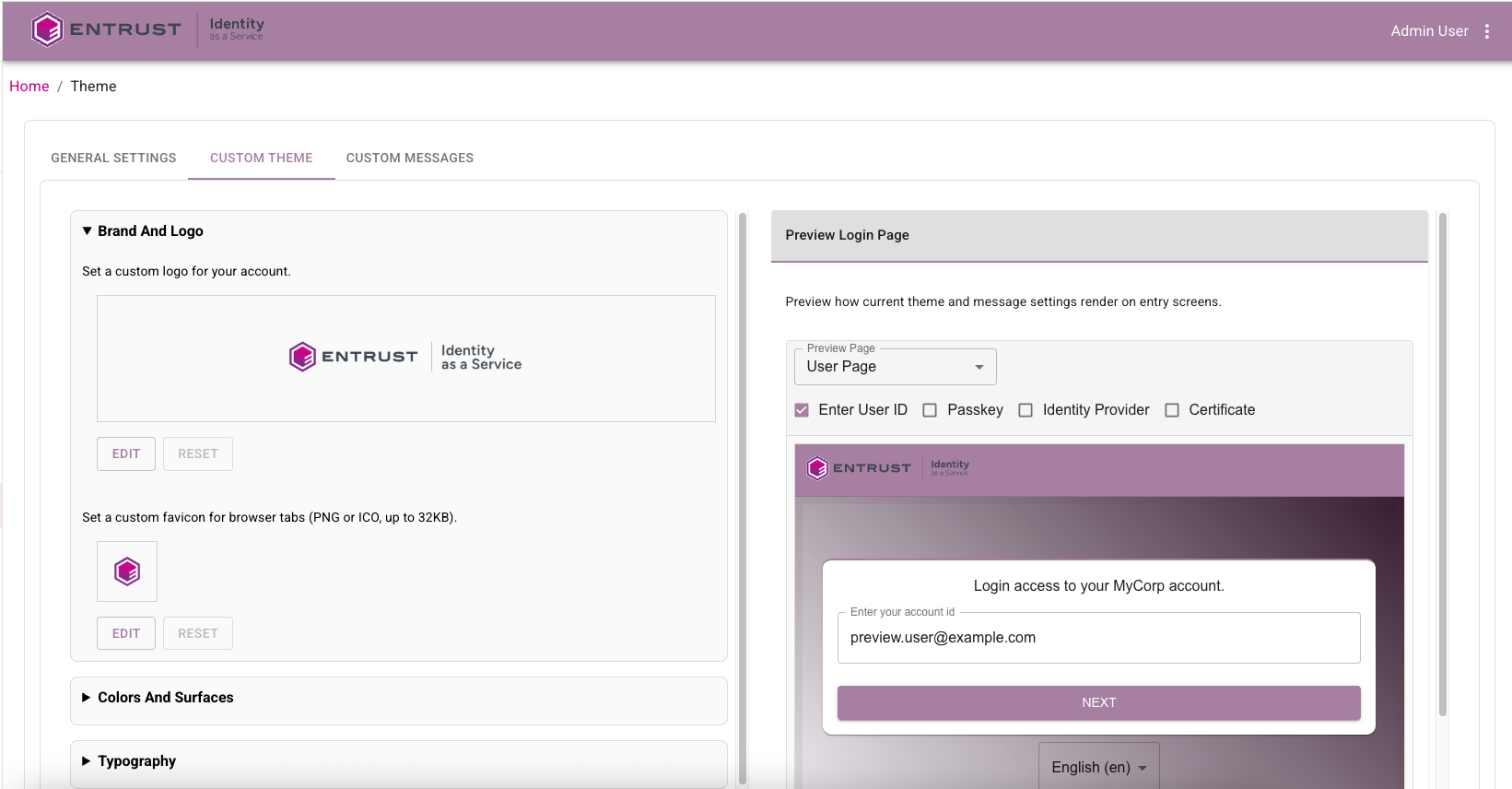
    Brand customization configuration showing logo and page branding controls

    Theme color customization configuration showing brand color controls

  • Login page layout and flow controls. Configure login card appearance, heading alignment, message-of-the-day placement, login flow order (credentials-first or passwordless-first), and collapsed secondary login options.
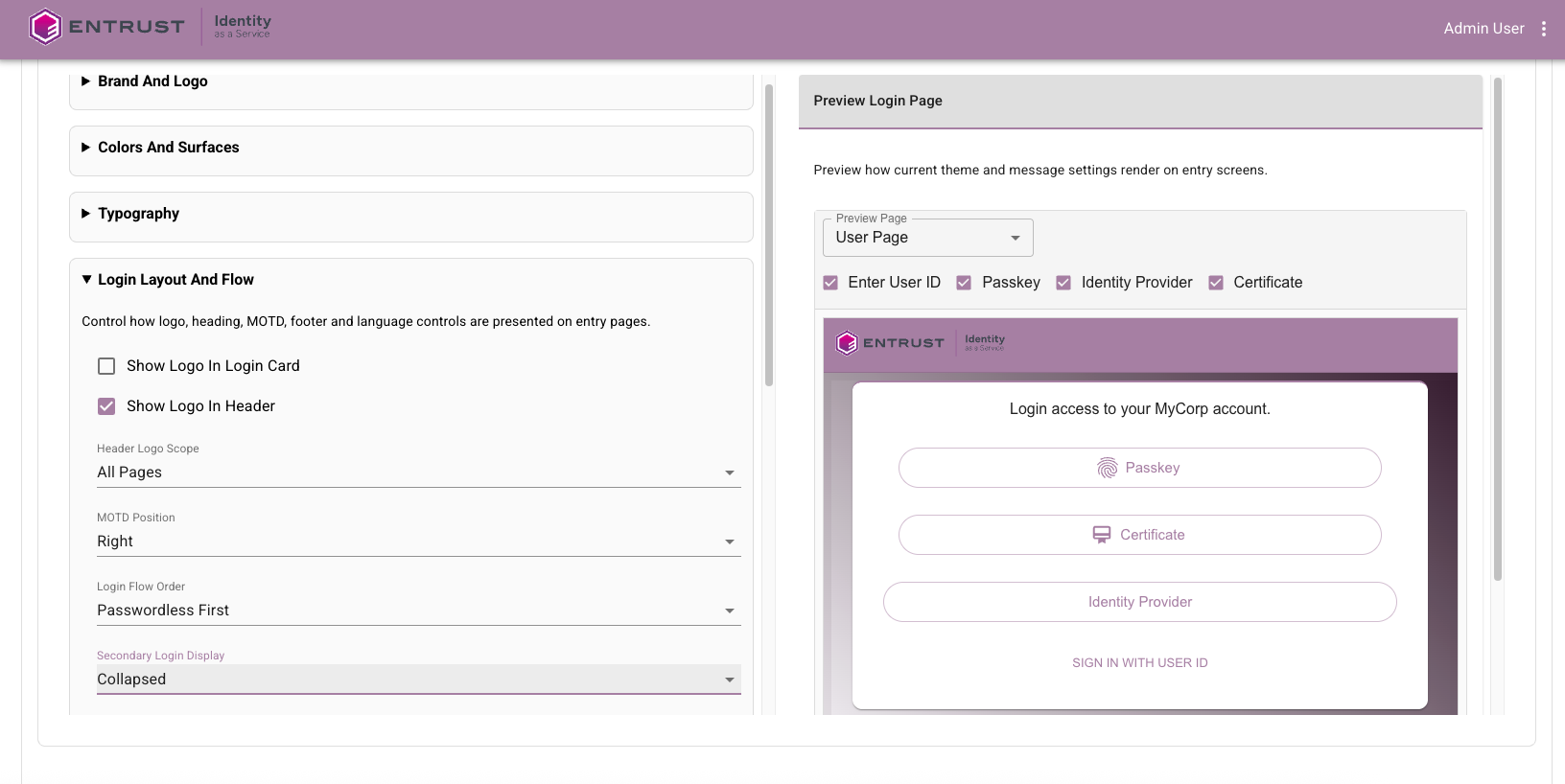
    Login flow customization showing passwordless sign-in controls

  • Per-application login optimization. For supported applications, optionally combine username and password onto a single page, control forgot-password link visibility for combined login, and enable user/administrator portal switching when experiences differ.
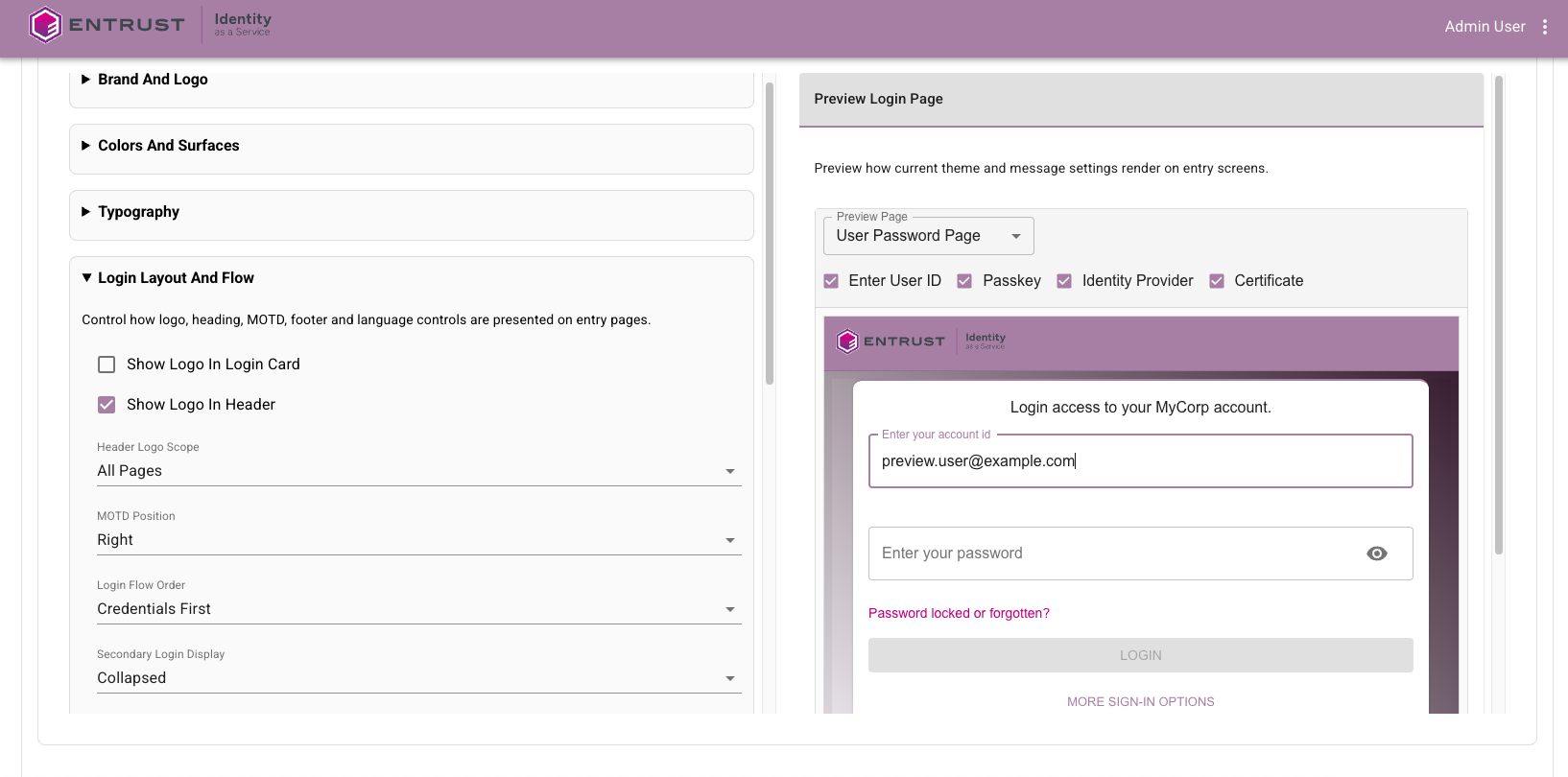
    Application login customization showing combined username and password controls

  • Custom login messages and localization. Override user-facing login strings, configure per-locale text, and manage large text updates with import and export JSON workflows.
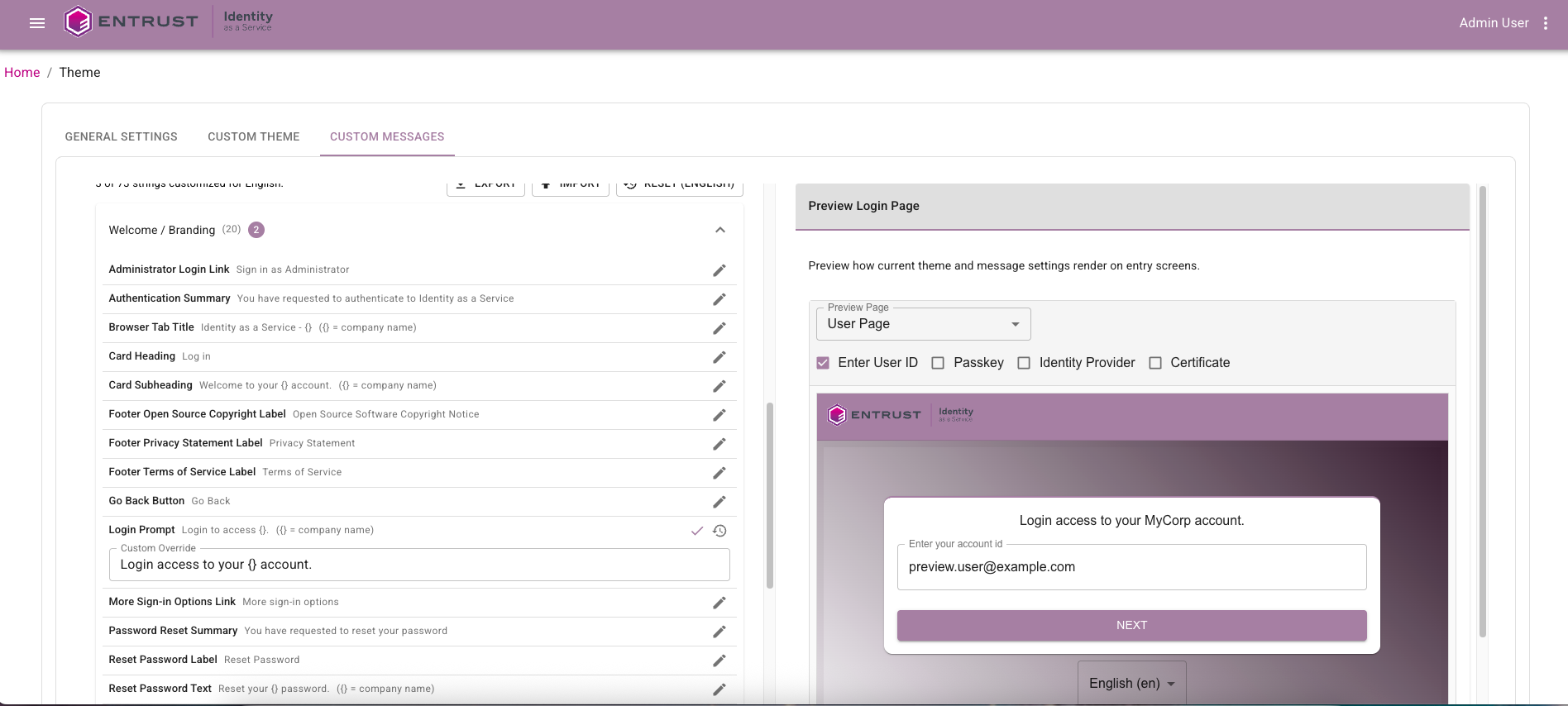
    Custom page text configuration showing user-facing text controls

  • Multilingual experience controls. Restrict language selectors to supported locales and use account-default fallback behavior when unsupported locales are requested.
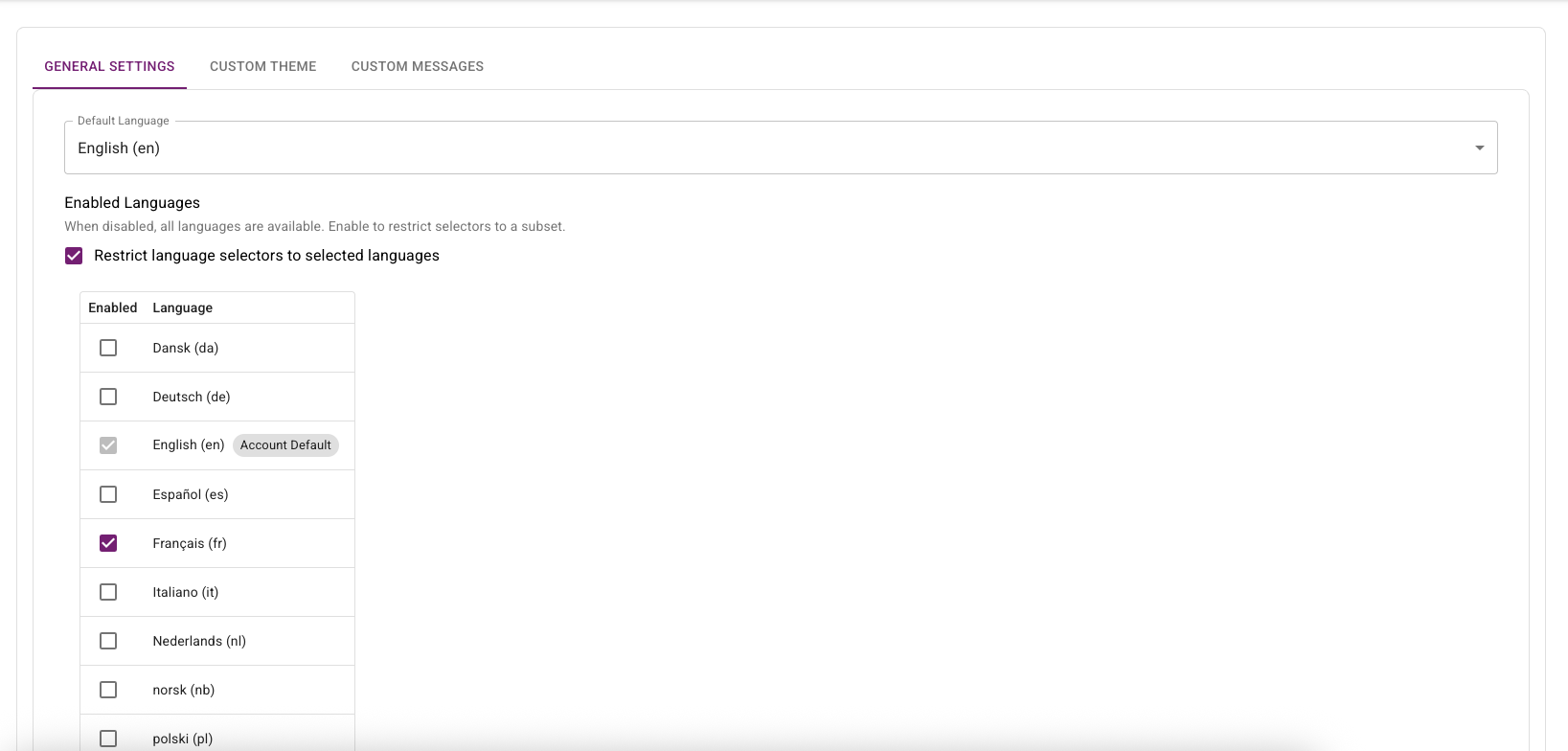
    Language restriction configuration showing supported locale selection

  • Footer and legal notice controls. Replace default footer legal items with organization-specific Terms of Service, Privacy Statement, and copyright, or hide footer elements as needed.
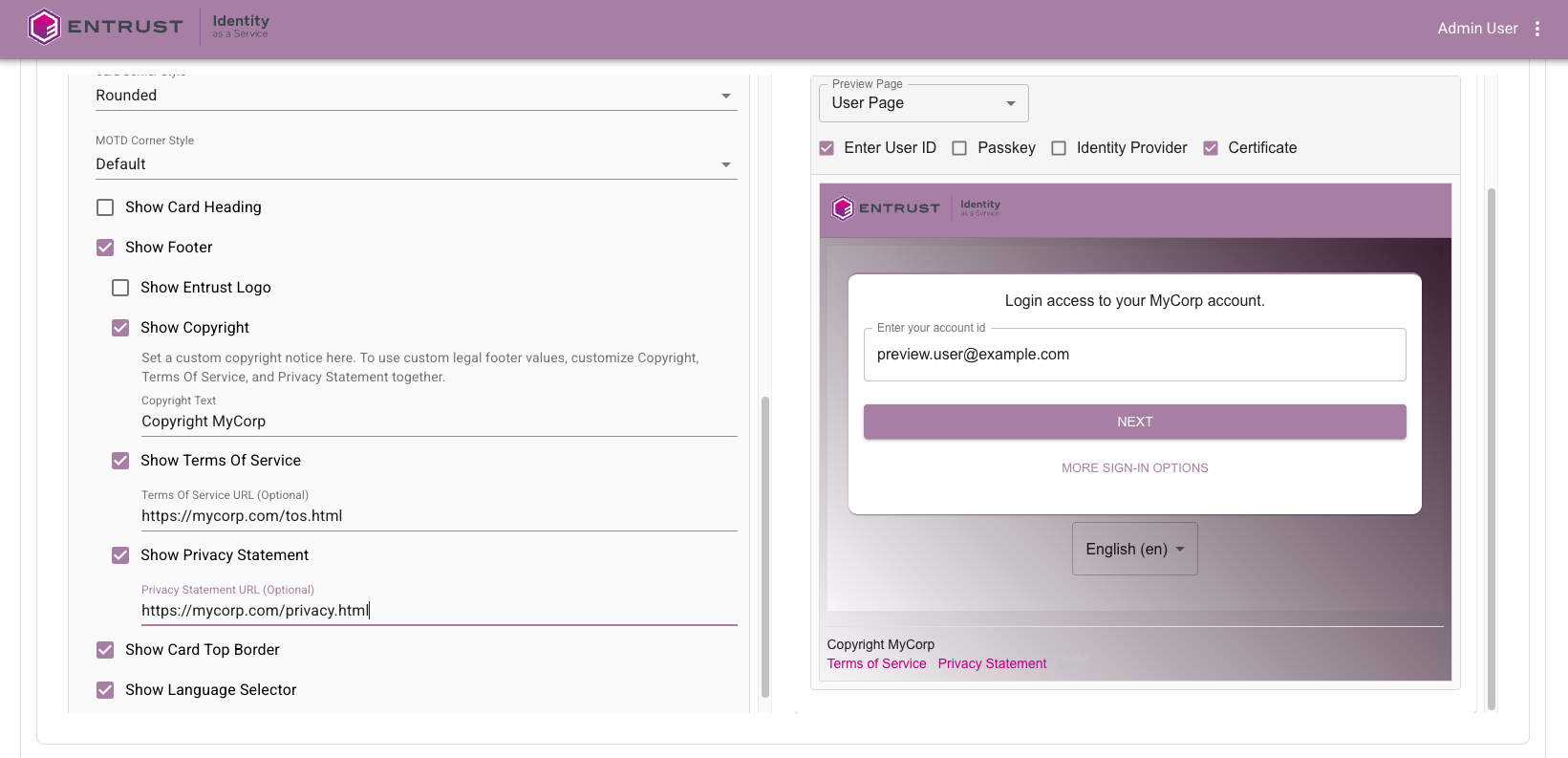
    Footer and legal notice customization showing copyright and legal link controls

These enhancements let organizations align sign-in with brand and compliance requirements while reducing user friction. They also support clearer user guidance and stronger operational consistency across different applications and locales.
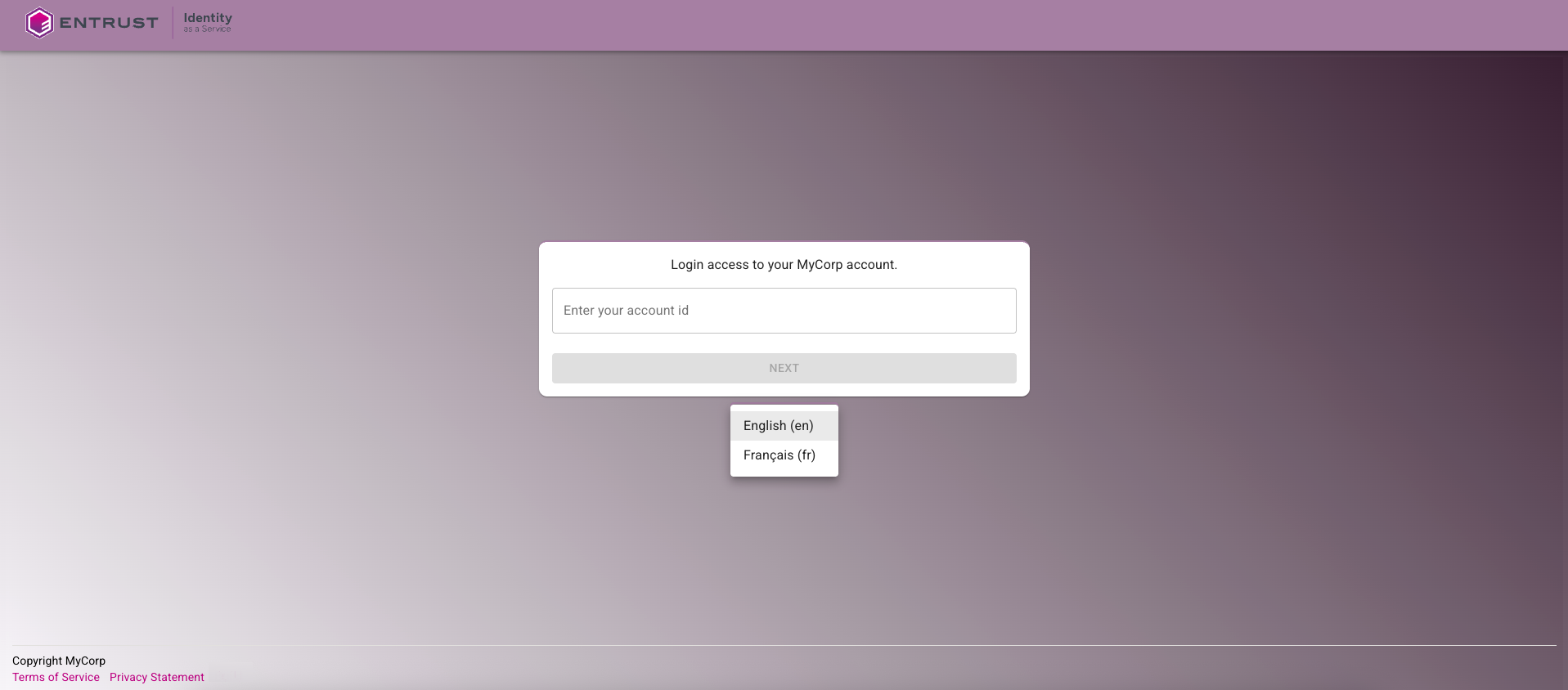
Custom login page result showing applied customization

For overview and configuration details, see Customization.

Entrust IDV verification support​

This release adds Entrust Identity Verification as a user verification option using document and biometric checks:

  • Document plus biometric verification flow. Users can verify their identity during onboarding by scanning a government-issued ID and completing a facial recognition check.
  • Policy-level enablement in user verification. Administrators can enable Entrust Identity Verification in Policies > Registration > User Verification, either as a standalone method or alongside SAML/OIDC Identity Provider verification.
  • Automatic verified status and authenticator provisioning. On successful verification, user status is set to Verified and a Face Authenticator is automatically created for the user, reducing onboarding friction and preparing a reusable factor for future second-factor and account recovery scenarios.
  • Web and mobile coverage. The verification experience is supported for both browser and mobile flows.
  • Operational outcomes for review and failure. Verification outcomes include Verified, Under review, and Failed, with guidance for fallback verification when needed.
  • Post-onboarding security use case. The automatically provisioned Face Authenticator supports later second-factor use cases, including password recovery.

These enhancements provide a higher-assurance verification path for organizations that need more than federated IdP verification alone, while also reducing user friction by automatically preparing a reusable biometric authenticator after onboarding that can be used for account recovery scenarios such as password recovery.

For overview, setup, and usage details, see Entrust Identity Verification.

OIDC and OAuth security enhancements​

This release introduces OIDC and OAuth security enhancements and new configuration controls:

  • PAR support (RFC 9126). Added support for Pushed Authorization Requests, including a PAR endpoint (/api/oidc/par) for authorization code flows. Instead of sending full authorization request parameters in front-channel browser URL query strings, clients can send them over a back-channel request and use a short request_uri during redirect.
  • JAR support (RFC 9101). Added support for JWT Secured Authorization Requests so request parameters can be integrity-protected as signed JWT request objects.
  • Expanded OIDC signing algorithm and key support. Added support for RSA-PSS (PS256, PS384, PS512) with RSA keys, and Elliptic Curve keys with ECDSA algorithms (ES256, ES384, ES512) for OIDC request and token signing scenarios. You can also require specific accepted signing algorithms for signed request inputs.
  • DPoP support (RFC 9449). Added Demonstrating Proof of Possession support to bind tokens to client key material and reduce token replay risk if tokens are intercepted.
  • IDaaS Authentication JavaScript SDK DPoP support: Added DPoP support in the IDaaS Authentication JavaScript SDK for OIDC flows. For SDK documentation, see https://github.com/EntrustCorporation/idaas-auth-js.
  • Expanded token endpoint client authentication options. Added support for additional client authentication and credential configuration options, including private_key_jwt, spiffe_jwt, and managed key material through jwks_uri or inline JWK/JWKS.
  • New OIDC application security settings. Added configuration options for client authentication and request hardening, including Private Key JWT, JWKS URI or inline JWK/JWKS, cryptographic signing algorithm selection (including JAR signing algorithms), PAR mode and format controls, and DPoP sender-constraint options.

These changes strengthen request integrity, reduce front-channel data exposure, and improve token theft resistance. Together, they provide stronger default security for OIDC integrations and give administrators clearer controls to enforce higher-assurance client behavior.

For implementation details, see OAuth and OIDC enhanced security features.

Workload identity and SPIFFE OIDC client authentication​

This release introduces first-class workload identity support for non-human identities (for example, service accounts, microservices, AI agents, and CI/CD workloads) and adds SPIFFE JWT-SVID support for OIDC client authentication.

  • Workload identity lifecycle support. Added workload identity create, view, update, and delete APIs with role-based permissions for workload management operations.
  • Admin portal workload management UI. Added a dedicated Workload Identities experience with list and detail views, active and inactive state control, owner and group assignment, OIDC settings, claims mapping, and workload-linked audit visibility.
  • Workload OIDC authentication options. Workload identities use OIDC client credentials flows and can be configured with supported token endpoint client authentication methods, including the new spiffe_jwt option.
  • SPIFFE JWT-SVID authentication method. Added SPIFFE JWT-SVID (spiffe_jwt) as an OIDC token endpoint client authentication method for workload and machine-to-machine scenarios.
  • Workload runtime controls and audit visibility. Added inactive workload enforcement, workload last-authentication tracking, and enhanced workload authentication auditing, including SPIFFE ID context when applicable.
  • Expanded workload claim mapping. Added workload-oriented claim mapping sources, including group-derived values, workload identity attributes, and SPIFFE ID.

These enhancements provide stronger controls for machine identity lifecycle management while improving workload authentication assurance and auditability in OIDC client credentials flows. SPIFFE support is significant because it adds trust-domain and SPIFFE ID pattern validation for machine identities, which strengthens authentication assurance and improves audit traceability.

For an overview and configuration details, see Workload identities. For a customer-focused look at how SPIFFE and DPoP work together to reduce replay risk, see How SPIFFE and DPoP reduce credential theft risk for modern workloads.

Passkey policy and attestation controls​

This release adds stronger policy controls for which passkeys can be registered and used for authentication.

  • Authenticator restrictions. You can allow all authenticators, allow only selected authenticator models, or block selected authenticator models. Model-level restrictions are based on authenticator identity metadata provided by the FIDO Alliance Metadata Service, so you can define exactly which passkey types are permitted in your tenant.
  • Unknown authenticator handling. You can control whether authenticators that are not recognized in trusted metadata are allowed or blocked.
  • Device-bound enforcement. You can require device-bound passkeys and block synced passkeys where needed.
  • Expanded policy guidance. The Passkey/FIDO2 policy guidance now helps administrators choose a policy posture, understand security and compatibility tradeoffs, and plan rollouts for user verification, device-bound passkeys, attestation, authenticator restrictions, and non-compliant authenticator enforcement.

These controls are important because they let you enforce your organization's passkey trust requirements, reduce risk from untrusted or non-compliant authenticators, and align passkey usage with security and compliance policy.

For policy setup details, see Configure Passkey/FIDO2 authenticator settings.

Directory synchronization delta sync enhancements​

Delta sync is now the default for scheduled on-premises Active Directory synchronization runs. This release also introduces clearer synchronization mode controls so administrators can choose between Delta and Full sync when they run Force sync.

Delta sync means IDaaS does not run a full directory scan on every run. Instead, it reads only objects that changed since the last successful synchronization (for example, newly created users, updated attributes, membership changes, or disabled accounts).

This is useful because most directory data does not change between synchronization runs. By processing only changed objects, IDaaS completes scheduled synchronizations faster, generates less load on LDAP and network infrastructure, and reduces the chance that long-running full directory scans overlap with business-hour operations. It also lets you run synchronization jobs more frequently, so directory updates are reflected in IDaaS more quickly.

This release includes the following Active Directory synchronization improvements:

  • Delta sync is now the default for scheduled Active Directory synchronization runs. IDaaS processes only changed directory objects since the previous checkpoint.
  • Force Sync now supports both Full and Delta modes for on-premises Active Directory. Use Full for a complete directory scan, especially after configuration changes, and use Delta for incremental synchronization.
  • Improved synchronization efficiency. Processing only changed objects reduces LDAP and network load, decreases payload size, and improves synchronization runtime.
  • Clearer operational recovery path. If a user fails synchronization because required attributes or identifiers are invalid, update the user in Active Directory and the next delta sync can process that corrected change.

For configuration details, see Delta sync and full sync for Active Directory.

User portal redesign and authenticator flow improvements​

This release redesigns the user portal profile experience and improves core self-service workflows for activity review, authenticator management, and registration reliability.

  • New user portal profile shell and navigation. Introduced a consistent profile page design across user portal profile sections, with a profile header and horizontal tab navigation, so navigation is simpler, pages behave more consistently on mobile and desktop, and accessibility is improved.
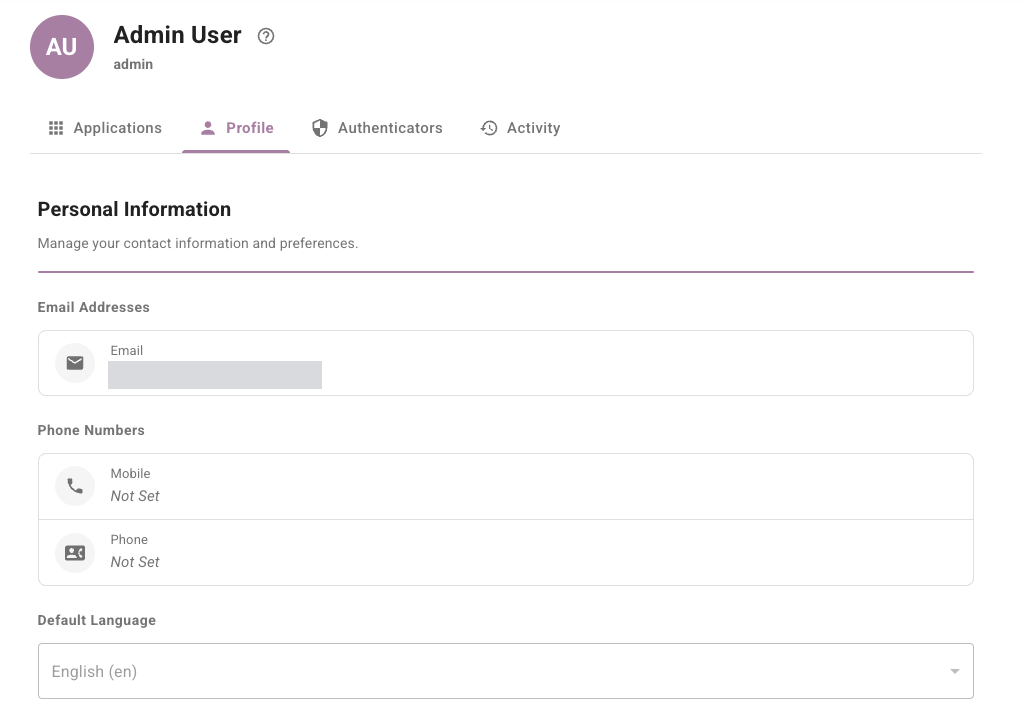
    User portal profile view showing profile shell and navigation tabs

  • Redesigned activity experience. Moved activity into an integrated profile tab with outcome filters, time-range filters, pagination, and improved event readability.
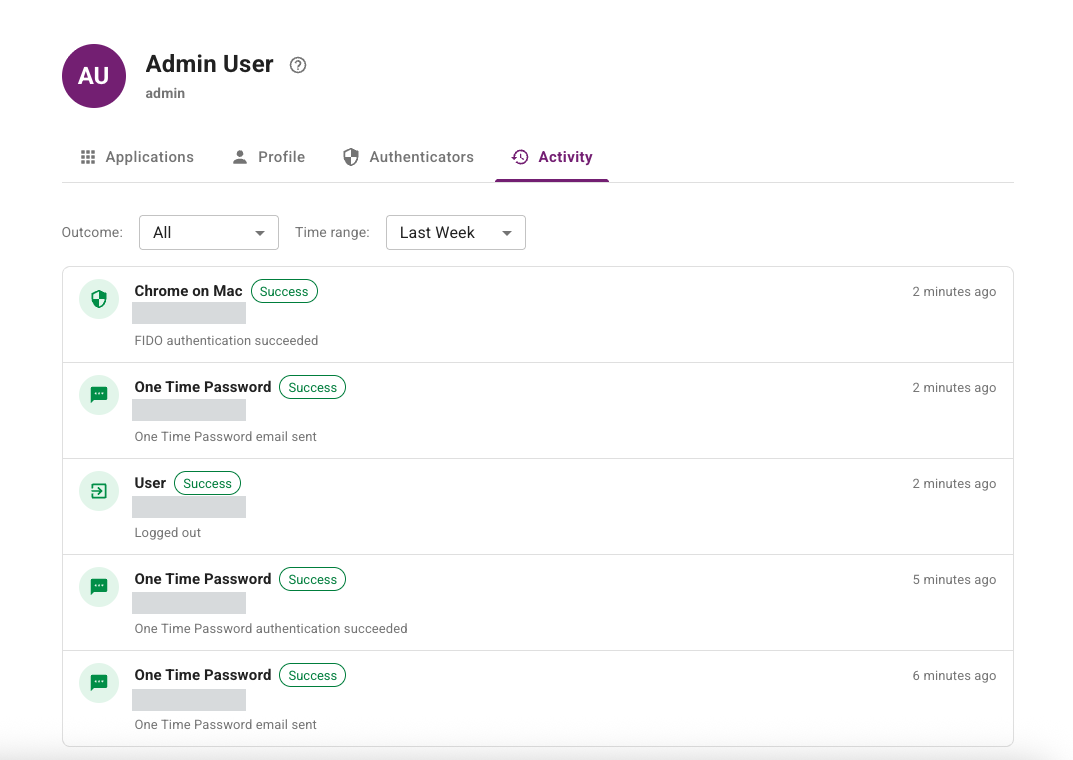
    User portal activity view showing timeline and filters

  • Modernized profile and authenticator management pages. Updated profile and authenticator experiences with newer UI patterns and improved consistency across flows.
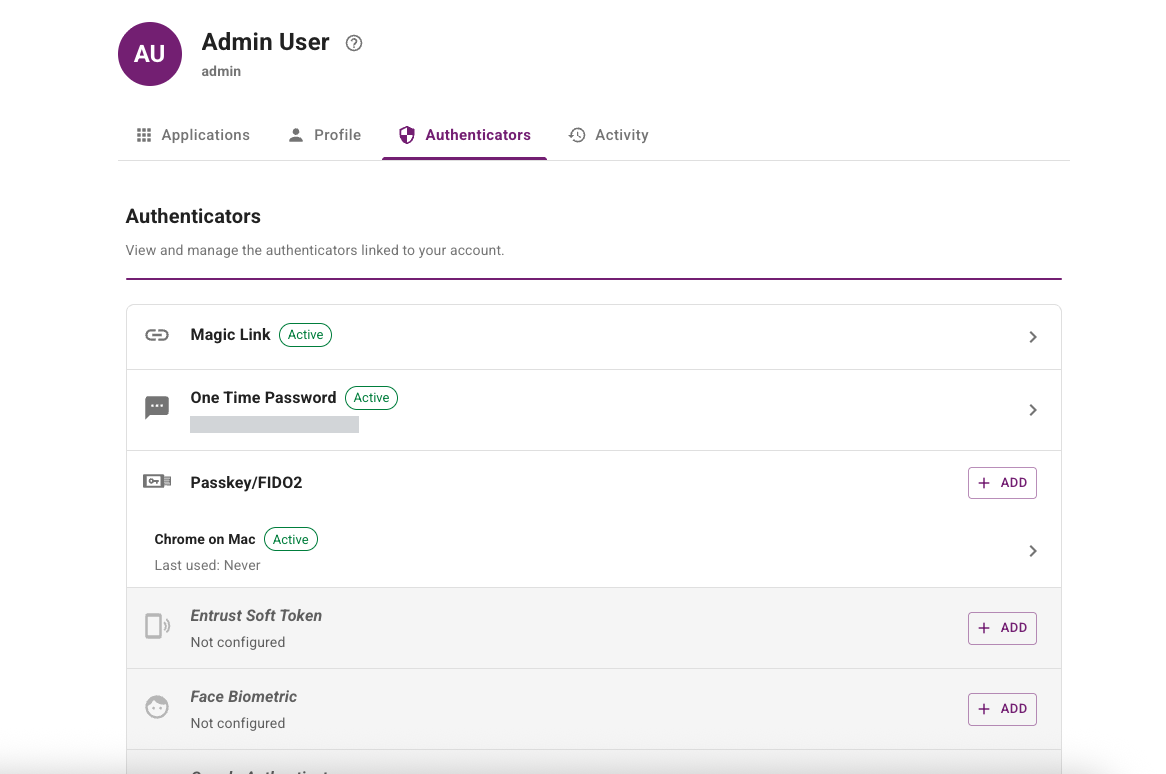
    User portal authenticators view showing registered authenticators

  • Passkey registration improvements. Updated registration behavior, including support for automatic passkey naming.

For a User Portal overview and links to configuration procedures, see User Portal settings.

Administration portal dashboard analytics and audit investigation improvements​

This release modernizes the Administration portal dashboard and improves how administrators investigate and filter audit activity.

  • Dashboard layout refresh. Updated visual hierarchy and section layout across Account Summary, System Alerts, Authentication Activity, and Recent Activity to improve readability and at-a-glance monitoring on desktop and mobile viewports.
  • New Authentication Activity panel. Added selected-period metrics for total, successful, and failed authentications with success and failure percentages, plus ranked Top Applications and Top Authenticators views.
  • Drill-down investigation workflow. Added one-click drill-down from Authentication Activity entries into pre-filtered audit results to speed up investigation.
  • Authenticator insights improvements. Updated authenticator distribution visualization with more stable chart color behavior and improved empty-state handling.
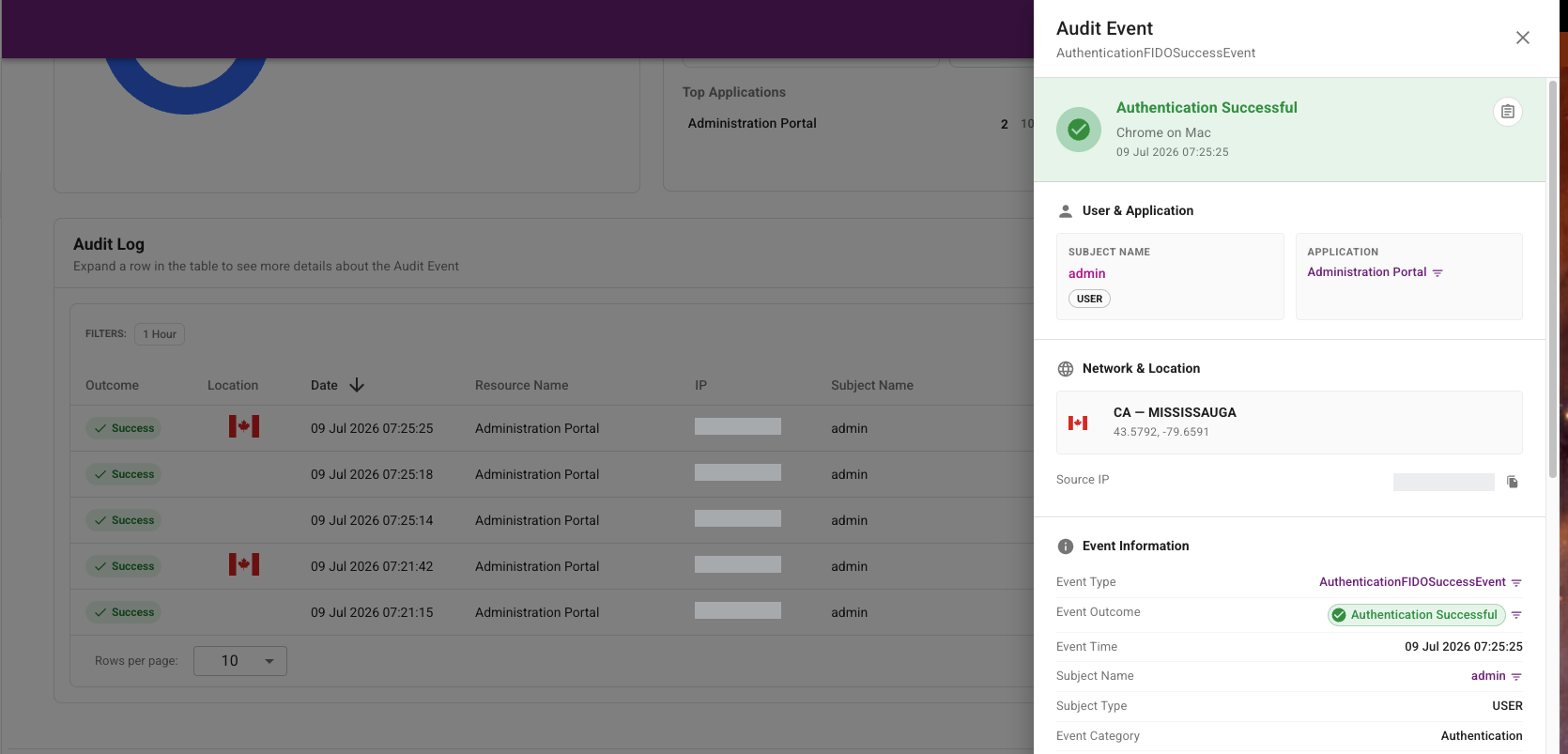
  • Audit details experience upgrade. Replaced the previous audit details dialog with a right-side details drawer that provides richer grouped event context, quick field-level filtering actions, and copy-all event details.

The first screenshot shows the updated dashboard analytics experience. The second screenshot shows the updated audit investigation experience.
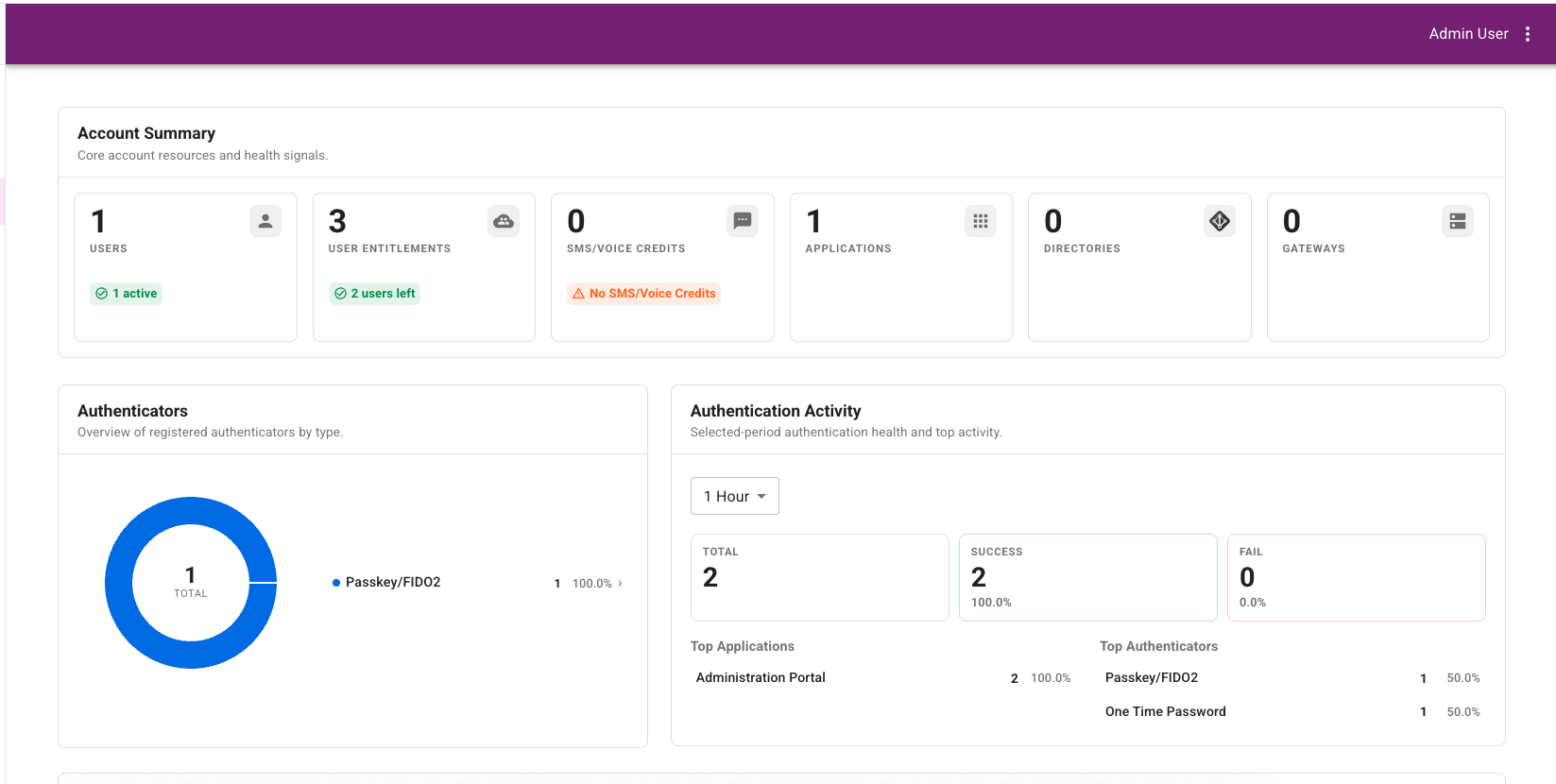
Dashboard authentication activity panel showing key statistics

Dashboard audit drill-down view showing filtered audit results

For dashboard and audit workflow details, see Dashboard and View and export audit logs.

Documentation updates​

This release also includes documentation updates that make existing configuration and operational guidance easier to find and use:

  • Accessibility conformance report. Added the current Accessibility Conformance Report (ACR), created from the Voluntary Product Accessibility Template (VPAT), which documents how IDaaS conforms to accessibility standards and helps organizations evaluate accessibility and procurement requirements. See Accessibility.
  • System requirements. Added supported TLS versions and cipher suites, production egress IP addresses for server-initiated outbound requests from IDaaS, and updated Entrust Identity Verification SDK version information. See Requirements.
  • External risk engines. Expanded guidance for external risk engine scenarios, including risk signal categories, transaction details, connector setup, placeholders, request mapping, response extraction, and risk assessment rules. See Manage external risk engines and Configure connector-based risk engines.
  • Resource rules. Expanded resource rule guidance with clearer explanations of access filters, risk evaluation, authentication flow selection, strict access behavior, common rule patterns, and troubleshooting for access denial. See Create and manage resource rules.
  • Authenticator planning. Added an authenticator selection guide to compare available authenticators, deployment considerations, recovery effort, deployment patterns, and assurance-level recommendations. See Authenticator selection guide.
  • Account recovery planning. Added guidance for planning account recovery and authenticator readiness across password reset, help desk verification, user unlock, first-time authenticator registration, User Portal self-management, and Face Biometric recovery after Entrust Identity Verification. See Account recovery and authenticator readiness.
  • Application integration procedures. Refined SAML, OIDC/OAuth, RADIUS, and API application integration procedures for clearer setup flow and navigation. See Manage applications.
  • Login options. Added reference guidance for application sign-in method support, selection behavior, and related User Login settings. See Manage login options.
  • Directory synchronization. Added a directory synchronization overview with key concepts, synchronization scheduling, Force sync behavior, full and delta synchronization modes, Active Directory delta sync defaults, and guidance for choosing Full sync after configuration changes. See Manage directory synchronization.
  • OIDC and OAuth foundations. Added supporting pages for OAuth/OIDC basics, examples and tokens, and token validation best practices. See OAuth and OIDC foundations.
  • Identity Provider and migration guidance. Updated generic OIDC Identity Provider and migration documentation for clarity and correctness. See Identity Providers and Migration.
  • Audit log reference. Added entity type descriptions, expanded the authentication event reference, and documented management event types. See View and export audit logs.

Fixed or changed in this release​

  • Restored the View Scopes action in the Users List action menu when prerequisites are met. (42060)
  • Fixed missing audit attribute details for embedded OIDC application refresh token grant-type settings. (41685)
  • Resolved an audit logging error that occurred in specific automated test scenarios. (42131)
  • Fixed intermittent 503 errors during Microsoft Entra ID sign-in. (42372)
  • Fixed a 503 sign-in error that occurred in specific account configurations. (42336)
  • Corrected authenticator status display for AD connector users whose password state is locked. (42381)
  • Fixed duplicate audit generation when updating AD sync group filters and desync policy settings. (40787)
  • Prevented saving SAML assertion encryption settings when no encryption certificate is loaded. (40763)
  • Fixed an error when adding a user password in cases where email is unavailable. (38685)
  • Added support for HTTPS localhost URIs as OIDC redirect and logout URIs for local development scenarios. Previously, only HTTP URLs were supported for localhost. (42230)
  • Fixed Assigned Token filtering when Date Last Used is set to Never. (42199)
  • Fixed an issue where, after navigating to any page other than the first page of a list and performing an action that opens another page, the list did not refresh correctly when returning. (40828)
  • Restored missing audit events for specific IdP authentication failure paths. (41686)
  • Restored missing group details in bulk hardware token import audit events. (41026)
  • Fixed bulk user operation filtering so Set User results are returned correctly. (37694)
  • Fixed client IP audit logging for authentications through vanity URLs so the originating client address is captured correctly in audit events. (41845)
  • Fixed custom date and time filtering behavior for hardware token data. (28385)
  • In the audit list, EQUALS is now set as the default operator for all applicable filter fields. (38448)
  • Updated permission handling so users without directory permissions are blocked in the UI from accessing AD connector synchronization pages, instead of encountering an error. (42200)
  • Fixed 1Password autofill submission behavior on login challenge screens. (42617)
  • Fixed missing localization for password email notification serialNumber and Identifier fields. (41852)
  • Fixed missing localized Welcome Subscriber email templates for service provider accounts. (40651)
  • Fixed missing localization for the duplicate webhook name error message. (42157)
  • Fixed registration and login flows so the selected language is honored instead of reverting to the user's profile language. (41975)
  • Fixed a 500 error for invalid phone challenge data in AD sync OTP voice flows. (42540)
  • Clarified token recovery actions by updating Token Unlock labeling to Token PIN Unlock in relevant user and administrator flows. (42378, 42379)
  • Fixed managed-role profile visibility when users belong to both managed and unmanaged groups. (41692)
  • Fixed field alignment issues on the Policies > Authenticators page in Microsoft Edge. (41412)
  • Fixed a null pointer error when minimum password lifetime is enabled and last-changed time is missing. (42527)
  • Fixed a save issue in resource rule configuration after clearing country search in geolocation settings. (40603)
  • Fixed a null pointer error when loading applications for the current user. (42364)
  • Improved passkey Windows Hello icon visibility against default backgrounds. (42525)
  • Fixed portal redirect behavior when the hostname cannot be found. (35078)
  • Improved account-name encoding for Google and Microsoft Authenticator provisioning. (42573)
  • Disabled unavailable Provisioner page actions for the auditor role. (40620)
  • In Smart Credential hardware settings, renamed SC Hardware Best Option to Best Available. (34538)
  • Fixed duplicate email notifications for locked users when both user notifications and locked-email settings are enabled. (42521)
  • Corrected a typo in the Require Consent label for the OIDC and OAuth Generic Web Application template. (41930)
  • Fixed saving RBA rules when geolocation risk factors are selected and country search text is cleared. (41071)
  • Fixed saving modifications to the Google token activation email template. (42172)
  • Improved push-notification failure handling for Entrust Soft Token: IDaaS now stops trying to deliver push notifications after prior delivery failures, including common non-recoverable cases such as a token removed from the mobile app or the app removed from the device. If delivery needs to resume for that token, administrators can perform a token reset; if delivery fails again, push is disabled again for that token. (41986)
  • Corrected entitlement grace-period warning timing. (42036)
  • Removed obsolete User Set Bulk operation options that were still shown in the UI. (42383)
  • Fixed audit entity-name display for user password unlock events. (42368)
  • Extended the configurable inactivity threshold period from 365 days to 1,095 days. (41961)
  • Improved password reset rule validation for current-password checks. (42377)
  • Added distinct AD and LDAP directory-type indicators in both directory list and directory details (add/edit) pages. (42280, 42435)
  • Fixed Password Reset Magic Link option display for non-default named password settings in group policy. (42511)
  • Fixed disable behavior and messaging for locked Entrust Soft Token and Google Authenticator, including corrected confirmation and email wording. (42352)
  • Fixed deletion handling for smart credentials associated with decommissioned certificate authorities. (42339)
  • Fixed eGrid save failures in specific browser scenarios. (40871)
  • Disabled submission for managed-role updates of unassigned grid cards and tokens when no group is selected. (38867)
  • Fixed authentication flow name visibility for read-only permission scenarios. (40877)
  • Increased the maximum number of named passwords allowed from 5 to 20. (42974)
  • Fixed a save issue that prevented some users from updating Override Authenticator Preference settings. (42428)
  • Improved label layout on the Bulk Import IDE migration add page. (42146)
  • Fixed an incomplete Change Password experience that prevented users from saving password changes in specific flows. (42513)
  • Updated IDaaS Portal sign-ins through Identity Providers so OIDC and SAML requests use the configured Identity Provider max age instead of a separate portal default. (42928)
  • Fixed face biometric registration selection so expired, unregistered face biometrics are not considered when choosing a face biometric to register. (41287)
  • Status for AD Password shows Change Required when Active Directory requires the user to change their password at next sign-in. (42575)

Changes to Identity as a Service (IDaaS) APIs​

Authentication API​

New operations​

  • None.

Removed operations​

  • None.

Changed operations​

  • None.

Changed models​

  • UserAuthenticateQueryParameters
    • Added: response (string) - Added a response parameter used with the combined user ID and password authentication mode.

Administration API​

New operations​

  • GET /api/web/v1/settings/fido/authenticators (listAuthenticatorsUsingGET) - List FIDO authenticators.

Removed operations​

  • None.

Changed operations​

  • None.

Changed models​

  • FIDOAuthenticatorModel
    • Added: New schema representing FIDO authenticator model metadata used by passkey authenticator trust-policy configuration.
  • FIDOAuthenticatorSettings
    • Added: authenticatorTrustMode (string) - Defines how authenticator trust is evaluated.
    • Added: authenticatorList (array) - List of authenticator models used for allow or deny policy decisions.
    • Added: unknownAuthenticatorPolicy (string) - Defines how unknown authenticator models are handled.
    • Added: nonCompliantAuthenticatorPolicy (string) - Defines how non-compliant authenticator models are handled.
    • Required added: authenticatorTrustMode, unknownAuthenticatorPolicy, nonCompliantAuthenticatorPolicy.
  • FIDOAuthenticatorSettingsParms
    • Added: authenticatorTrustMode (string) - Defines how authenticator trust is evaluated.
    • Added: authenticatorList (array) - List of authenticator models used for allow or deny policy decisions.
    • Added: unknownAuthenticatorPolicy (string) - Defines how unknown authenticator models are handled.
    • Added: nonCompliantAuthenticatorPolicy (string) - Defines how non-compliant authenticator models are handled.
  • DirectorySync
    • Added: deltaCrawl (boolean) - Indicates whether directory synchronization runs in delta mode.
    • Added: forceCrawlSequence (integer) - Tracks force-crawl sequence handling for synchronization workflows.

Enterprise Service Gateway (ESG) Deprecation​

Entrust supports the last four releases of the Enterprise Service Gateway (the current version 5.47 and the three previous releases 5.44, 5.45, and 5.46, which includes 5.46.1). Entrust recommends that customers always upgrade their Enterprise Service Gateway to the latest release because each release contains security updates to the Enterprise Service Gateway Operating System.

ESG compatibility notice

In an upcoming release, changes are planned that will break versions of ESG older than 5.33.
Release 5.46.1

· One min read

Fixed or changed in this release​

This patch release introduces Enterprise Service Gateway (ESG) version 5.46.1 to address the following Linux security vulnerabilities:

  1. CVE-2026-31431.
  2. CVE-2026-43284.
  3. CVE-2026-43500.
  4. CVE-2026-46300.

Security impact note: These vulnerabilities can allow a user who has access to the ESG to gain root privileges. By default, the only user with access to the ESG already has root privileges. Unless you have added additional Linux users to the ESG, these vulnerabilities are not expected to affect your deployment.

Release 5.46

· 15 min read

New in this release​

Webhooks​

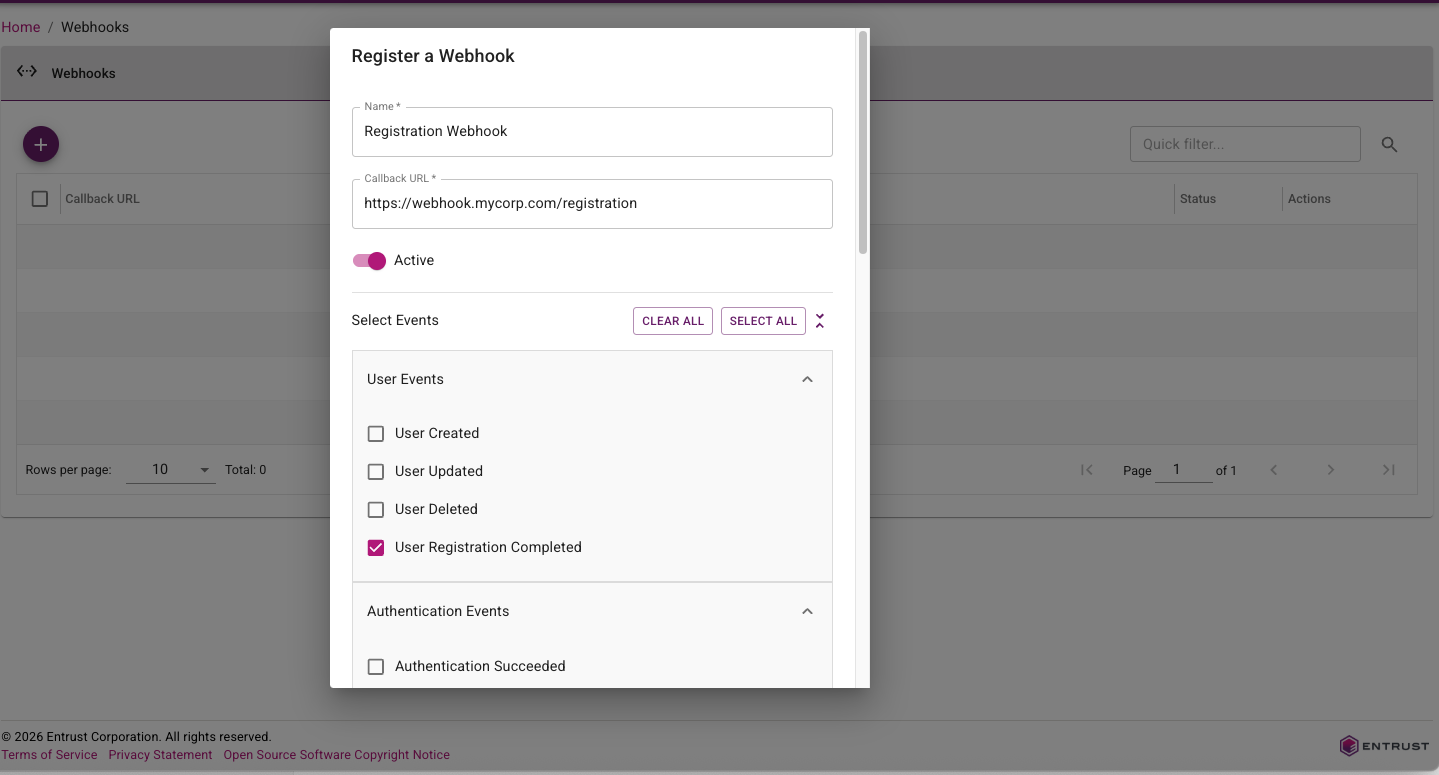
Webhooks in this release are expanded and easier to use. IDaaS now supports a broader event catalog across user lifecycle, authentication outcomes, credentials, passkeys, tokens, grids, and magic links, with additional detailed information for each event. Webhook delivery now follows a standard HTTP message signing model (RFC 9421) to simplify verification in downstream services, and webhook administration has been improved with clearer configuration metadata (including required webhook names) and more flexible testing options, such as overriding the callback URL during test calls.

Webhook configuration page showing registering a webhook for user registration events

For more information, see the Webhook customer use cases guide.

Documentation Portal​

This release of IDaaS introduces a new documentation portal that combines admin guidance, developer resources, and release notes in one place.

The new documentation portal includes the following features:

  • Improved searching.
  • LLM-friendly content export support for AI-assisted knowledge workflows.

For portal access and navigation, see the IDaaS documentation portal home.

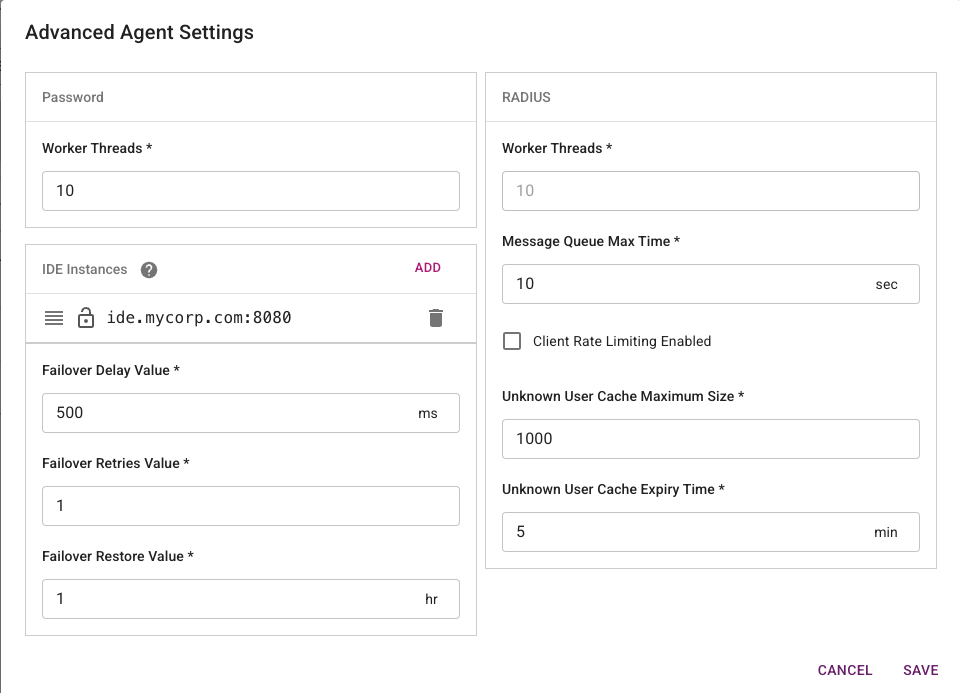
Identity Enterprise Agent Migration Enhancements​

The Identity Enterprise (formerly IdentityGuard) Agent in the Enterprise Service Gateway has been enhanced to support progressive migration of customers from Identity Enterprise to IDaaS. When handling authentication requests from an Identity Enterprise client, the agent first tries to forward the request to IDaaS. If the user does not exist in IDaaS, the agent will then forward the request to Identity Enterprise. This allows a customer to migrate their users from Identity Enterprise to IDaaS in stages without forcing immediate client-side changes across all legacy integrations.

Identity Enterprise Agent configuration page showing progressive migration routing settings

For configuration and routing behavior details, see Configuring an Identity Enterprise Agent.

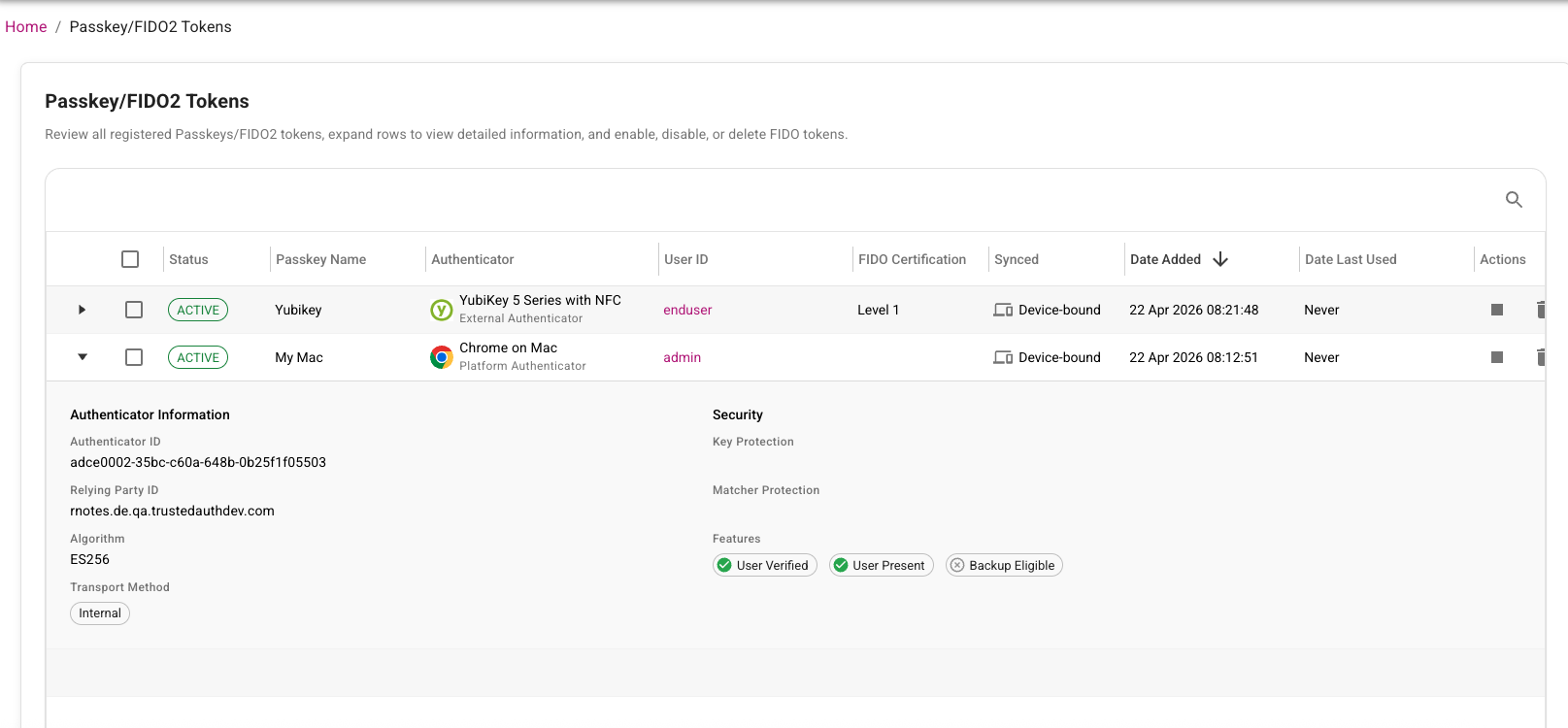
Passkey Attestation​

This release introduces passkey attestation enhancements to improve trust during passkey registration and lifecycle management. IDaaS now captures and evaluates attestation-related registration details so administrators can better validate authenticator provenance and strengthen phishing-resistant authentication policies.

In addition, administrators now have an option to list passkeys, making it easier to review registered passkeys, identify stale or duplicate credentials, and support user troubleshooting and cleanup workflows. Together, these improvements help security teams make stronger authenticator trust decisions while giving operations teams better passkey inventory visibility and lifecycle control.

Passkey attestation page showing registered passkeys with attestation details and trust status

For solution overview and platform context, see Passkey basics and IDaaS Passkey/FIDO2 authenticator management.

User External ID Enhancements​

User External ID enhancements make it easier for customers to link external account information to the corresponding IDaaS account by mapping and persisting customer-managed user identifiers in IDaaS. External ID values can be assigned through directory sync, inbound IdP claims, the Administration API, bulk operations, or SCIM provisioning. External IDs can be included in SAML attributes or OIDC claims and be used for API-based lookups.

SAML application attribute configuration showing external ID mapping

OIDC application claims configuration showing external ID mapping

For configuration details and integration examples, see Configure external ID for users.

This release adds a new setting to automatically send a magic link when a new user is created. The link can take the user directly to IDaaS to complete verification and initial registration, reducing onboarding friction and speeding time to first sign-in.

The Magic Link redirect URL validation is now more flexible but still preserves application safety. Previously, the requested redirect URL had to exactly match an allowed URL. Now, IDaaS validates the base redirect URL and ignores differences in query parameters. This lets clients include route or state parameters so users can return to a specific page in the same application after completing the magic link flow.

For customer scenarios and implementation patterns, see Magic links solution guide.

Portal Enhancements​

The following changes have been made to the Administration portal to improve usability, so administrators can complete common setup and governance tasks faster with fewer navigation and context-switching steps:

  • The administrator Add Role page has been updated to improve usability. See Create, assign, and manage roles.

    Updated Add Role page showing improved role configuration layout

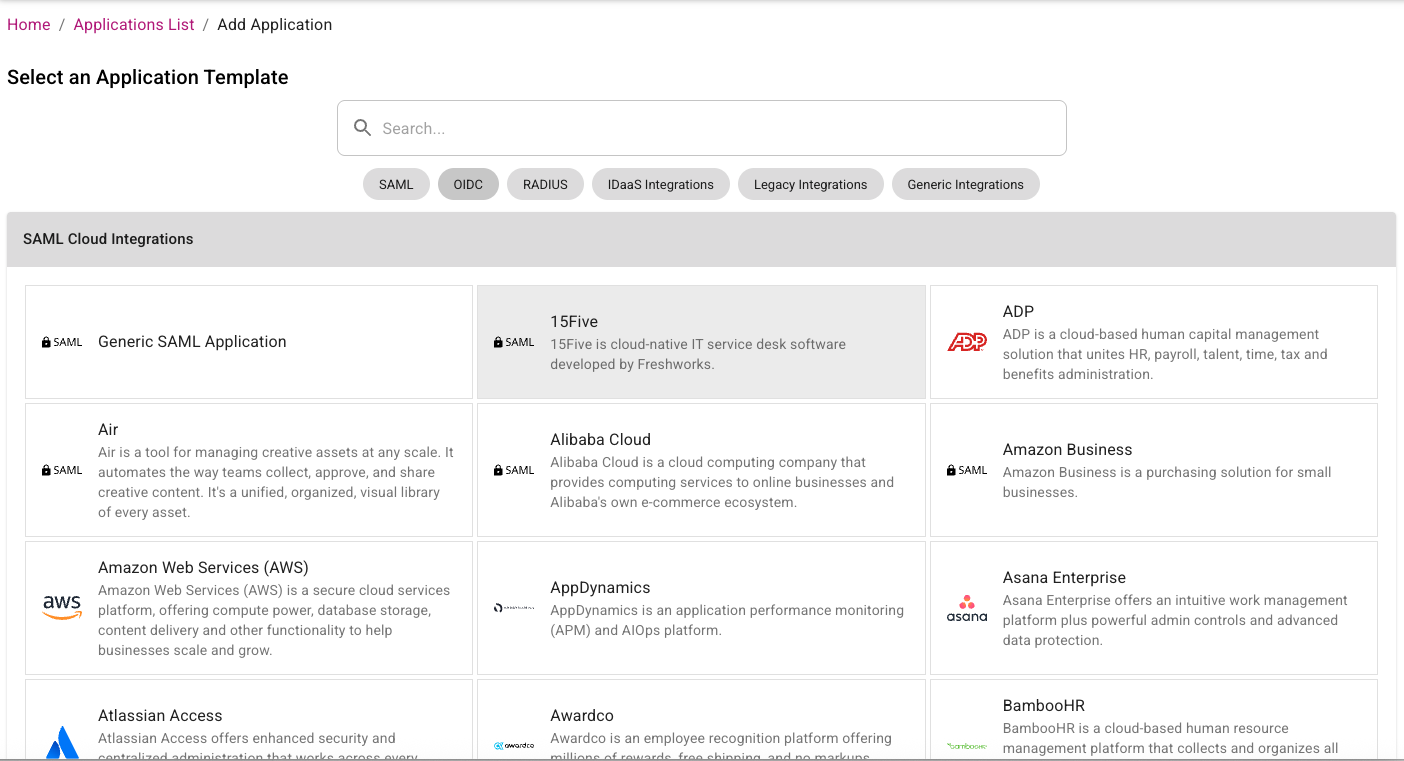
  • The Add Application page has been redesigned. Applications are now categorized by type and it is easier to select which type of application the administrator wants to view. See Manage applications.

    Redesigned Add Application page showing applications organized by category type

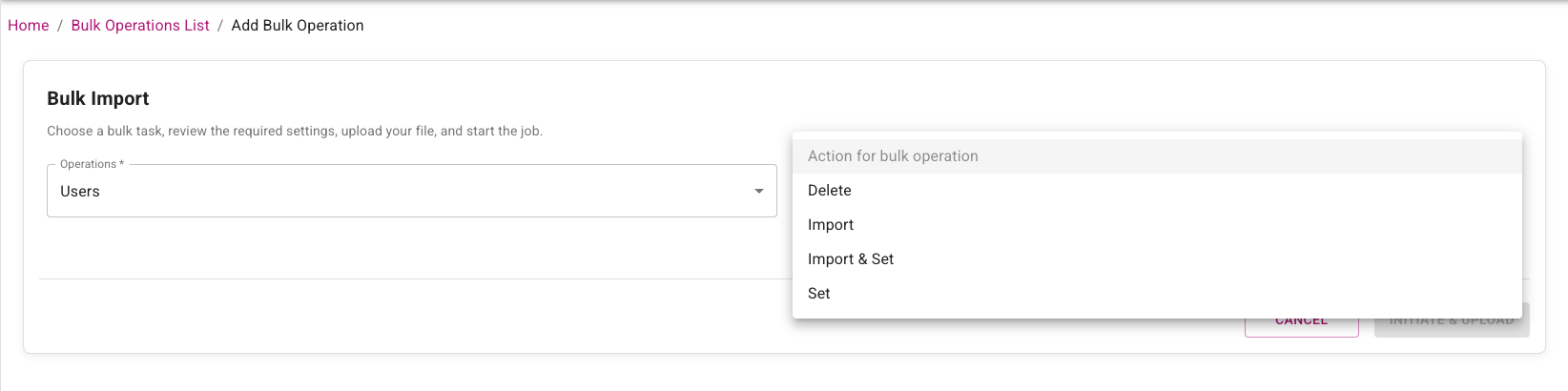
  • The Add Bulk Operations page has been modified so that the administrator selects the type of entity first and then the action. Previously the action was selected first. See Manage bulk operations.

    Updated Add Bulk Operations page showing entity type selection before action selection

  • The allowed resolution for custom logos has been increased from 450x150 to 900x300. See Brand your login pages.

  • Editing links in the Message of the Day has been fixed. See Customize the login page layout.

Content Security Policy (CSP) Changes​

The Content Security Policy used by IDaaS has been made stricter in this release. The following changes have been made:

  • Remove Google Analytics and font endpoints.
  • Use specific S3 bucket endpoints instead of broader AWS endpoints.

Fixed or changed in this release​

  1. The Verify User action required the Add permission for the authenticator being used. This is no longer required. (42124)
  2. Change to how Google Authenticators in the activating state are treated during registration. (42067)
  3. Named password UI fixes: reset-password named password not saved until refresh; named password cleanup; and small-window layout fix for named password group policy. (42025, 41810, 41714)
  4. Risk Factor source IP address in resource rules causing Create OTP Auth API failure. (42030)
  5. For OIDC applications, initiate Login URL should not be mandatory. (41991)
  6. SIEM customization tab logo not saving. (41983)
  7. Directory configuration Group Filter not honored in AD LDS. (41974)
  8. Changing tabs in the application UI can overwrite changes. (41936)
  9. Audit searches with empty subjectName should ignore the search attribute. (41917)
  10. Admin portal error after user password authentication. (41888)
  11. Generic 500 error on password reset URL. (41873)
  12. Bulk import sample CSV had duplicate security ID in audit. (41856)
  13. Validate search parameters for assigning preferred OTP provider to tenants/accounts. (41798)
  14. Named password flow and audit validation updates: disable named passwords for system-defined auth flows; enforce namedPasswordId check in Admin API password reset; and use named password UUID in group policy audit updates. (41797, 41640, 41163)
  15. Password reset email from admin portal showed "default" in email body. (41763)
  16. Alternative OTP delivery methods not working at portal login when non-default method selected in user profile. (41769)
  17. Magic link login invalid_token error. (41755)
  18. SCIM: add user as provisioned user if user already exists. (41734)
  19. Named password audit/log consistency updates for bulk password reset and SAML forgot password, plus password-only group policy reset audit behavior. (41730, 41729, 41722, 41719)
  20. Trimmed challenge response through ESG IdentityGuard Agent. (41689)
  21. Default group policy category on password when present. (41620)
  22. Service Provider tenant management role not working if no site role assigned. (41514)
  23. Null Pointer Exception (NPE) during TransactionDetails check. (41452)
  24. Email notification did not specify which password was changed. (41333)
  25. SCIM provisioning failure when token expired. (41305)
  26. Application description could not be set to blank. (41218)
  27. SAML application max age disable behavior for -1 updated with day-based time handling. (41072)
  28. SP auditor role should be able to view tenant usage details dialog. (41065)
  29. Allow upload of WeChat service account QR code. (41049)
  30. Token push verify user cancel audit permission update. (40818)
  31. Verify user grid for specified-one missing userId in audit. (40562)
  32. Previous passwords cannot be reused: inconsistent behavior when resetting password with current password. (30638)

Changes to Identity as a Service (IDaaS) APIs​

Authentication API​

New operations​

  • None.

Removed operations​

  • None.

Changed operations​

  • None.

Changed models​

  • FIDORegisterChallenge
    • Added: attestation (string) - Attestation preference for passkey/FIDO2 registration. Determines how much information about the authenticator (security key/passkey) is shared during registration. NONE: No authenticator details shared (recommended for privacy). INDIRECT: Basic information shared in a privacy-preserving way (balanced approach). DIRECT: Full authenticator details shared (use when you need to verify specific device models).
  • FIDORegisterResponse
    • Added: transports (array<string>) - The transport methods used during registration (for example, 'usb', 'nfc', 'ble', 'internal'). Used to determine authenticator capabilities.
  • FIDOToken
    • Added: aaguid (string) - The AAGUID of the authenticator that created this FIDO token.
    • Added: aaguidVerified (boolean) - Indicates whether the AAGUID reported by the authenticator was cryptographically verified via a full certificate chain against the FIDO MDS trust anchors. True only for DIRECT attestation; false for INDIRECT (cert chain not verified); null for NONE (no attestation collected).
    • Added: algorithm (string) - The signature algorithm of the authenticator that created this FIDO token.
    • Added: attestationFormat (string) - Attestation format of the authenticator that created this FIDO token.
    • Added: attestedData (boolean) - Indicates if this FIDO token contains attested data.
    • Added: authenticatorModel (string) - The authenticator model of the authenticator that created this FIDO token.
    • Added: backupEligible (boolean) - Indicates if this FIDO token is eligible for backup.
    • Added: backupStatus (boolean) - Indicates if this FIDO token is currently backed up.
    • Added: icon (string) - The icon of the authenticator that created this FIDO token.
    • Added: userPresent (boolean) - Indicates if the user was present during the registration or authentication ceremony that created or last used this FIDO token.
    • Added: userVerified (boolean) - Indicates if the user was verified during the registration or authentication ceremony that created or last used this FIDO token.
  • GridChallenge
    • Added: cellAlphabets (string) - The cellAlphabets value specifies the characters that are valid for the cells in the grid challenge.
    • Required added: cellAlphabets.
  • UserAuthenticatorLockoutStatus
    • Added: locked (boolean) - Determines if this authenticator is currently locked out.

Administration API​

New operations​

  • GET /api/web/v1/async/tokenspaged/{id}/assigned/result (assignedTokenPageAsyncResultUsingGET) - Get the result of an asynchronous list assigned tokens operation.
  • GET /api/web/v1/async/tokenspaged/{id}/assigned/status (assignedTokenPageAsyncStatusUsingGET) - Get the status of an asynchronous list assigned tokens operation.
  • GET /api/web/v1/async/tokenspaged/{id}/unassigned/result (unassignedTokenPageAsyncResultUsingGET) - Get the result of an asynchronous list unassigned tokens operation.
  • GET /api/web/v1/async/tokenspaged/{id}/unassigned/status (unassignedTokenPageAsyncStatusUsingGET) - Get the status of an asynchronous list unassigned tokens operation.
  • GET /api/web/v2/async/gridspaged/{id}/assigned/result (assignedGridsPageAsyncResultUsingGET) - Get the result of an asynchronous list assigned grids operation.
  • GET /api/web/v2/async/gridspaged/{id}/assigned/status (assignedGridsPageAsyncStatusUsingGET) - Get the status of an asynchronous list assigned grids operation.
  • GET /api/web/v2/async/gridspaged/{id}/unassigned/result (unassignedGridsPageAsyncResultUsingGET) - Get the result of an asynchronous list unassigned grids operation.
  • GET /api/web/v2/async/gridspaged/{id}/unassigned/status (unassignedGridsPageAsyncStatusUsingGET) - Get the status of an asynchronous list unassigned grids operation.
  • GET /api/web/v4/async/userspaged/{id}/result (usersPagedAsyncResultUsingGET) - Get the result of an asynchronous list users operation.
  • GET /api/web/v4/async/userspaged/{id}/status (usersPagedAsyncStatusUsingGET) - Get the status of an asynchronous list users operation.
  • POST /api/web/v1/async/tokenspaged/assigned (assignedTokenPageAsyncUsingPOST) - Lists a page of assigned tokens asynchronously.
  • POST /api/web/v1/async/tokenspaged/unassigned (unassignedTokenPageAsyncUsingPOST) - Lists a page of unassigned hardware tokens asynchronously.
  • POST /api/web/v1/fidotokenspaged (getFIDOTokensPagedUsingPOST) - Get FIDO tokens (paginated).
  • POST /api/web/v2/async/gridspaged/assigned (assignedGridsPageAsyncUsingPOST) - Lists a page of assigned grids asynchronously.
  • POST /api/web/v2/async/gridspaged/unassigned (unassignedGridsPageAsyncUsingPOST) - Lists a page of unassigned grids asynchronously.
  • POST /api/web/v4/async/userspaged (usersPagedAsyncUsingPOST) - Lists a page of users asynchronously.

Removed operations​

  • POST /api/web/v4/tenants (createTenantUsingPOST)

Changed operations​

  • POST /api/web/v1/webhooks/test/{id} (testWebhookUsingPOST)
    • Request body: A request body was added.

Changed models​

  • FIDOAuthenticatorSettings
    • Added: attestation (string) - Attestation preference for passkey/FIDO2 registration. Determines how much information about the authenticator (security key/passkey) is shared during registration. NONE: No authenticator details shared (recommended for privacy). INDIRECT: Basic information shared in a privacy-preserving way (balanced approach). DIRECT: Full authenticator details shared (use when you need to verify specific device models).
  • FIDOAuthenticatorSettingsParms
    • Added: attestation (string) - Attestation preference for passkey/FIDO2 registration. Determines how much information about the authenticator (security key/passkey) is shared during registration. NONE: No authenticator details shared (recommended for privacy). INDIRECT: Basic information shared in a privacy-preserving way (balanced approach). DIRECT: Full authenticator details shared (use when you need to verify specific device models).
  • FIDORegisterChallenge
    • Added: attestation (string) - Attestation preference for passkey/FIDO2 registration. Determines how much information about the authenticator (security key/passkey) is shared during registration. NONE: No authenticator details shared (recommended for privacy). INDIRECT: Basic information shared in a privacy-preserving way (balanced approach). DIRECT: Full authenticator details shared (use when you need to verify specific device models).
  • FIDORegisterResponse
    • Added: transports (array<string>) - The transport methods used during registration (e.g., 'usb', 'nfc', 'ble', 'internal'). Used to determine authenticator capabilities.
  • FIDOToken
    • Added: aaguid (string) - The AAGUID of the authenticator that created this FIDO token.
    • Added: aaguidVerified (boolean) - Indicates whether the AAGUID reported by the authenticator was cryptographically verified via a full certificate chain against the FIDO MDS trust anchors. True only for DIRECT attestation; false for INDIRECT (cert chain not verified); null for NONE (no attestation collected).
    • Added: algorithm (string) - The signature algorithm of the authenticator that created this FIDO token.
    • Added: attestationFormat (string) - Attestation format of the authenticator that created this FIDO token.
    • Added: attestedData (boolean) - Indicates if this FIDO token contains attested data.
    • Added: authenticatorModel (string) - The authenticator model of the authenticator that created this FIDO token.
    • Added: backupEligible (boolean) - Indicates if this FIDO token is eligible for backup.
    • Added: backupStatus (boolean) - Indicates if this FIDO token is currently backed up.
    • Added: icon (string) - The icon of the authenticator that created this FIDO token.
    • Added: userPresent (boolean) - Indicates if the user was present during the registration or authentication ceremony that created or last used this FIDO token.
    • Added: userVerified (boolean) - Indicates if the user was verified during the registration or authentication ceremony that created or last used this FIDO token.
  • OTPAuthenticatorSettings
    • Added: otpWeChatDefaultDeliveryAttribute (string) - Id of the default WeChat OTP delivery attribute.
    • Removed: otpWechatDefaultDeliveryAttribute (string) - Id of the default Wechat OTP delivery attribute.
  • PasswordResetSettings
    • Added: namedPasswordName (string) - The name of the password.
  • User
    • Added: userPasswordDetails (array<UserPasswordDetails>) - A list of the user password details.
    • Flag changed: passwordCompromised deprecated: false -> true.
    • Flag changed: passwordExpirationTime deprecated: false -> true.
  • UserAuthenticatorLockoutStatus
    • Added: locked (boolean) - Determines if this authenticator is currently locked out.
  • Webhook
    • Added: name (string) - Descriptive name for the webhook to help identify its purpose.
  • WebhookEvent
    • Enum changed on type: added user.created, user.updated, user.deleted, user.registration.completed, authentication.succeeded, authentication.failed, password.updated, magiclink.email.sent, grid.created, grid.email.sent, grid.password.email.sent, passkey.created, passkey.updated, passkey.deleted, kba.question.created, token.created, token.activated, token.activated.online, token.seed.rotated, hardware.token.assigned, face.biometric.created, credential.create, credential.update, credential.delete, credential.print.
  • WebhookParms
    • Added: name (string) - Descriptive name for the webhook to help identify its purpose.
    • Changed: enabled - Improved description. Indicates whether the webhook is active and will receive event notifications. Disabled webhooks will not receive any events.
    • Required added: name.

Supported TLS Ciphers​

IDaaS supports the following TLS Ciphers:

TLSv1.3:

  • TLS_AES_128_GCM_SHA256
  • TLS_AES_256_GCM_SHA384
  • TLS_CHACHA20_POLY1305_SHA256

TLSv1.2:

  • ECDHE-RSA-AES128-GCM-SHA256
  • ECDHE-RSA-AES256-GCM-SHA384
  • ECDHE-RSA-CHACHA20-POLY1305

Enterprise Service Gateway (ESG) Deprecation​

Entrust supports only the last four releases of the Enterprise Service Gateway (the current version 5.46 and the three previous releases 5.43, 5.44, and 5.45). Entrust recommends that customers always upgrade their Enterprise Service Gateway to the latest release because each release contains security updates to the Enterprise Service Gateway Operating System.

NOTE: In an upcoming release, changes are planned that will break versions of ESG older than 5.33.
In-place upgrade of the ESG is only supported for versions 5.33 or later. Versions of ESG older than 5.33 are no longer supported. To upgrade versions of ESGs older than 5.33 to the new version, use the following procedure:

  1. Download the latest Gateway OVA or Hyper-V file from IDaaS and install on a new VM instance.
  2. Add a new Gateway instance to the existing Gateway in IDaaS.
  3. Register the new Gateway instance with IDaaS.
  4. Disable the old Gateway instance.
  5. Repeat these steps to replace all the Gateway instances that use older versions of the ESG.

Once the upgrade is complete, the Gateway instances corresponding to the old ESGs can be deleted from IDaaS and the VMs for those ESG instances can also be deleted.

Browser Deprecation​

Microsoft no longer supports the Internet Explorer 11 and Microsoft Edge Legacy browsers. Identity as a Service no longer supports these browsers.

Release 5.45

· 9 min read

New in this release​

Support Multiple Passwords​

IDaaS users can now have multiple passwords associated with their account. This allows users to have different passwords for different authentication flows or applications. Administrators can configure multiple passwords for users and assign each with a unique password policy.

SCIM Enhancements​

The following enhancements have been made to SCIM support in this release:

  • Support for custom schemas.
  • Mapping additional IDaaS attributes to SCIM attributes, including RegistrationStatus to indicate whether the user is registered.
  • Support for setting values into multivalued complex type SCIM attributes like email.
  • Improved logging.

UI Improvements​

In the IDaaS Administration portal, all the "Policy" pages and bulk operation pages have been redesigned to improve usability.

OAuth Improvements​

A new document "OAuth and OIDC Basics" has been added to the IDaaS Developer Hub. This document provides an overview of OAuth 2.0 and OpenID Connect (OIDC) concepts.

A new OIDC application template, "Generic Embedded Application," is now available in IDaaS. This template enables administrators to implement a custom, self-hosted login experience that keeps users within your application during authentication, while still relying on an OpenID Connect provider to issue standards-compliant tokens.

CORS Changes​

For new IDaaS accounts, CORS is now enabled by default. Existing accounts are not affected by this change but Entrust recommends that customers enable CORS for their existing accounts.

Fixed or changed in this release​

  1. Generic Native application client ID copy to clipboard fails - The copy to clipboard function for client ID was not working for Generic Native applications, though it worked for other OIDC apps. (41215)
  2. Authentication API calls for OIDC IDaaS JWT grant type need to be added to CORS Allow list - Authentication API calls for IDaaS JWT grant types are now automatically allowed for CORS.(41203)
  3. Group policy Face Biometric Mutual Challenge alphabet error handling - Setting Face Biometric mutual challenge alphabet to a single character and saving resulted in an error without an error message. (41316)
  4. IDaaS Doc ER: SAML SLO configuration and expected behavior - Documentation needs to specify the resulting behaviors expected from IDP or SP initiated logout and whether it results in global logout. (39797)
  5. Magic link auth email changing to blank when the defined custom email contact changed to SMS - When adding a custom email contact, changing group policy magic link default email to the custom contact, then changing the custom email contact type to SMS, the default email becomes blank. (40636)
  6. SCIM Provisioner User Attribute Mappings filter for the Required field is a text field - The filter field should be restricted to yes/no options rather than free text. (40462)
  7. Test Directory Configurations result dialog contains a typo - "All group filter" should be "All group filters". (40827)
  8. Unsaved changes warning does not retain user on the same Authenticator edit page when "Cancel" is clicked - When navigating to Policy → Authenticators, editing an Authenticator without saving, then clicking another Authenticator, an unsaved changes pop-up appears. However, clicking "Cancel" navigates to the previously selected Authenticator instead of staying on the current page with unsaved changes. (41281)
  9. OIDC Authentication Unexpected server error, authentication request invalid - After redirecting to IDaaS from the customer service provider using an OIDC integration, allowing five minutes to elapse before proceeding results in "server error: Unexpected server error, authentication request invalid" error. (40883)
  10. IDaaS SAML user creation not recognizing role - When a user is created after IDP authentication, role assignment during user creation is not working. Role claims that include underscores and role claims returned as lists are not properly processed. (41319)

Changes to Identity as a Service (IDaaS) APIs​

Authentication API​

New models​

PasswordChallenge​

New model introduced to support password challenge scenarios.

  • name (string) - The name of the password challenge
  • namedPasswordId (string) - The Named Password Id associated with the challenge

Changed models​

AuthenticatedResponse​
  • Added: passwordChallenge (PasswordChallenge) - Password challenge information returned when password authentication requires additional challenge
UserAuthenticateQueryResponse​
  • Added: passwordChallenge (PasswordChallenge) - Password challenge information for user authentication queries
UserAuthenticatorLockoutStatus​
  • Added: name (string) - The users named password authentication that is locked out.

Notes & migration guidance​

  • Password Challenge Support: A new PasswordChallenge model has been introduced to support scenarios where password authentication requires additional challenge information. This is part of the named password feature that allows users to have multiple distinct password authenticators.
  • Enhanced Authentication Responses: Both AuthenticatedResponse and UserAuthenticateQueryResponse now include an optional passwordChallenge field. Clients should handle this field to support multi-password authentication flows where a specific named password may be required.
  • Lockout Status Enhancement: The UserAuthenticatorLockoutStatus model now includes a name field to identify which specific named password authenticator is locked out, providing better visibility for troubleshooting and user support.
  • Non-Breaking Changes: All changes are additive (new optional fields and a new model). Existing client implementations will continue to work without modification, though they won't benefit from the enhanced password challenge capabilities until updated.

Administration API​

New operations​

  • DELETE /api/web/v1/users/{userid}/passwords/{namedpasswordid} (deleteUserNamedPasswordUsingDELETE): Delete a user password using the password ID
  • GET /api/web/v1/users/{userid}/list/passwords (getUserNamedPasswordsUsingGET): Gets a list of user passwords
  • GET /api/web/v1/users/{userid}/settings/password/{namedpasswordid} (getUserNamedPasswordSettingsUsingGET): Get user password authenticator settings by named password ID
  • PUT /api/web/v1/users/{userid}/password/{namedpasswordid}/notify (sendUserNamedPasswordExpiryNotificationUsingPUT): Update and send a password expiry notification using password ID

Removed operations​

  • DELETE /api/web/v1/users/{userid}/activesyncdevices/{deviceid} (removeActiveSyncDeviceUsingDELETE): Delete ActiveSync device
  • GET /api/web/v1/serviceipaddresses (getServiceIPAddressesUsingGET): Get service IP addresses
  • GET /api/web/v1/users/{userid}/activesyncdevices (getCachedActiveSyncDevicesUsingGET): Get ActiveSync devices
  • POST /api/web/v1/users/{userid}/activesyncdevices (getActiveSyncDevicesUsingPOST): Manage ActiveSync device
  • PUT /api/web/v1/users/{userid}/activesyncdevices (updateActiveSyncDevicesUsingPUT): Update ActiveSync device

Changed models​

AuthenticationFlow​
  • Added: namedPasswordId (string) - The Named Password Id used for password authentication.
AuthenticationFlowParms​
  • Added: namedPasswordId (string) - The Named Password Id used for password authentication.
CorsOrigin​
  • Required added: id
  • Required added: origin
Entitlement​
  • Added: gracePeriodEndDate (string, date-time) - The USERS grace period end date of this entitlement in UTC time.
PasswordResetSettings​
  • Added: id (string) - ID of the password reset settings.
  • Added: namedPasswordId (string) - The ID of the named password.
SmsVoice​
  • Added: gracePeriodEndDate (string, date-time) - The date when the grace period for the entitlement will end.
Tenant​
  • Added: otpProviderId (string) - The ID of the preferred OTP provider associated with this tenant, if any. Only visible to root tenant.
UserAuthenticatorLockoutStatus​
  • Added: name (string) - The users named password authentication that is locked out.
UserEntitlement​
  • Added: gracePeriodEndDate (string, date-time) - The date when the grace period for the entitlement will end.

UserPassword​

  • Added: id (string) - The ID of the user password.
  • Added: namedPasswordId (string) - The named password associated to the user.
UserPasswordParms​
  • Added: namedPasswordId (string) - The ID of the named password.
UserPasswordSettings​
  • Added: namedPasswordEnabled (boolean) - Indicates whether the named password policy is enabled for the user.
  • Added: namedPasswordId (string) - The ID of the named password.
UserPasswordValidationParms​
  • Added: namedPasswordId (string) - The ID of the named password.

Notes & migration guidance​

  • Named Password Support: The major theme of this release is support for named passwords. Multiple new properties (namedPasswordId) have been added across authentication flows, password settings, and user password models to enable multi-password scenarios per user. This allows users to have multiple distinct password authenticators with different policies.
  • New Password Management APIs: Four new endpoints provide granular password management by password ID, including listing all passwords for a user, deleting specific passwords, managing password expiry notifications, and retrieving password settings per named password.
  • ActiveSync Deprecation (Breaking): All ActiveSync device management endpoints have been removed. Clients using these endpoints must migrate to alternative device management solutions before upgrading.
  • Service IP Addresses Removal (Breaking): The /api/web/v1/serviceipaddresses endpoint has been removed. Clients relying on this endpoint should contact support for alternative approaches to obtaining service IP information.
  • Grace Period Tracking: Added gracePeriodEndDate to entitlement-related models (Entitlement, SmsVoice, UserEntitlement) to support grace period functionality for expired entitlements. This allows tenants to continue operating for a limited time after entitlement expiration.
  • CORS Origin Validation (Breaking): The CorsOrigin model now requires both id and origin fields. Ensure all CORS origin configurations include these required fields when creating or updating CORS origins.
  • OTP Provider Configuration: Tenants can now specify a preferred OTP provider via the otpProviderId property, providing flexibility in OTP delivery mechanisms.

Supported TLS Ciphers​

IDaaS supports the following TLS Ciphers:

TLSv1.3:

  • TLS_AKE_WITH_AES_128_GCM_SHA256 (ecdh_x25519)
  • TLS_AKE_WITH_AES_256_GCM_SHA384 (ecdh_x25519)
  • TLS_AKE_WITH_CHACHA20_POLY1305_SHA256 (ecdh_x25519)

TLSv1.2:

  • TLS_ECDHE_RSA_WITH_AES_128_GCM_SHA256 (ecdh_x25519)
  • TLS_ECDHE_RSA_WITH_AES_256_GCM_SHA384 (ecdh_x25519)
  • TLS_ECDHE_RSA_WITH_CHACHA20_POLY1305_SHA256 (ecdh_x25519)
  • TLS_ECDHE_RSA_WITH_AES_256_CBC_SHA384 (ecdh_x25519)
  • TLS_ECDHE_RSA_WITH_AES_128_CBC_SHA256 (ecdh_x25519)

On March 15, 2026, support for the following ciphers will be removed.

TLSv1.2:

  • TLS_ECDHE_RSA_WITH_AES_128_CBC_SHA256 (ecdh_x25519)
  • TLS_ECDHE_RSA_WITH_AES_256_CBC_SHA384 (ecdh_x25519)

Enterprise Service Gateway (ESG) Deprecation​

Entrust will only support the last four releases of the Enterprise Service Gateway (the current version 5.45 and the three previous releases 5.42, 5.43, and 5.44). Entrust recommends that customers always upgrade their Enterprise Service Gateway to the latest release because each release contains security updates to the Enterprise Service Gateway Operating System.

NOTE: In an upcoming release, changes are planned that will break versions of ESG older than 5.33.
In-place upgrade of the ESG is only supported for versions 5.33 or later. Versions of ESG older than 5.33 are no longer supported. To upgrade versions of ESGs older than 5.33 to the new version, use the following procedure:

  1. Download the latest Gateway OVA or Hyper-V file from IDaaS and install on a new VM instance.
  2. Add a new Gateway instance to the existing Gateway in IDaaS.
  3. Register the new Gateway instance with IDaaS.
  4. Disable the old Gateway instance.
  5. Repeat these steps to replace all the Gateway instances that use older versions of the ESG.

Once the upgrade is complete, the Gateway instances corresponding to the old ESGs can be deleted from IDaaS and the VMs for those ESG instances can also be deleted.

Browser Deprecation​

Microsoft no longer supports the Internet Explorer 11 and Microsoft Edge Legacy browsers. Identity as a Service no longer supports these browsers.

Feature Deprecation​

ActiveSync Device Management​

IDaaS provided a feature that allowed IDaaS users to perform secure, multi-factor authentication and manage their Microsoft Office 365 ActiveSync devices. The Office 365 capabilities that IDaaS used to implement these capabilities are no longer supported by Microsoft. This feature was removed from IDaaS in the 5.45 release.

Release 5.44.1

· One min read

Security Bulletin E25-012​

The documentation for configuring a Microsoft Certificate Authority (CA) with IDaaS has been updated to address issues described in Security Bulletin E25-012. Customers who have configured a Microsoft CA should review the security bulletin and apply the recommended actions.

Fixed or changed in this release​

  1. User Verify fails when token push is used. (41181)

Release 5.44

· 11 min read

New in this release​

IDaaS Authentication JavaScript SDK​

A new authentication javascript SDK has been released to facilitate integration of IDaaS authentication into web applications. It wraps hosted OIDC flows, risk-based authentication (RBA) challenges, and "convenience" methods (password, OTP, passkey, soft token, etc.) in a client.

The SDK can be found at https://github.com/EntrustCorporation/idaas-auth-js.

SMS OTP Message Format​

IDaaS now includes a new OTP policy setting OTP SMS Format. Administrators can select between two formats for SMS OTP messages:

  • Ends with OTP (existing format): OTP appears at the end of the message (for example, Your Entrust Identity as a Service OTP is 01234567).
  • Starts with OTP (new format): OTP appears at the start of the message (for example, 01234567 is your OTP for Entrust Identity as a Service).

Users may find having the OTP at the beginning of the message easier to retrieve.

Dashboard Enhancements​

The Dashboard in the IDaaS Administration Portal has been enhanced. Counts in the Authenticators and Authentication statistics panels are now interactive and allow the administrator to navigate to additional information:

  • Authenticators: clicking an entry opens the Members > Users list filtered to users who have that authenticator.
  • Authentications per Application: clicking an application opens the Audit Logs filtered to authentication events for that application.
  • Authentications per Authenticator: clicking an authenticator opens the Audit Logs filtered to authentication events performed with that authenticator.

A new Authenticator filter has also been added to the Audit Logs list, enabling administrators to view only authentication events for a specific authenticator.

Face Biometric Enhancements​

The following improvements have been made to the IDaaS Face Biometric authenticator:

  • The Onfido applicant created during registration is no longer required for authentication. Permanent Onfido profile data is therefore no longer retained.
  • Biometric data collected during registration can now optionally be stored in IDaaS instead of only in the Entrust Identity mobile application. This enables use cases such as account recovery when a user has a new device.
  • A new Face Biometric authenticator (including associated biometric data) can be provisioned through the Administration API. This allows results from an external Onfido verification workflow to be used directly to create an IDaaS Face Biometric authenticator.

Directory Synchronization Enhancements​

A new option has been added to directory sync configuration allowing a synchronized group to be converted to an "unsynchronized" (local) group instead of being removed from IDaaS. Removing a group also deletes associated policy and resource rules. Converting the group instead preserves those configurations.

When a directory user becomes a local user, all directory groups will be disassociated from the user.

Previously, when the user ID of a user was updated in the directory, the existing IDaaS user ID was stored as an alias of the user. Now, the existing IDaaS user ID is no longer stored as an alias. The following behavior has not changed: if the new user ID was already defined as an alias, it is removed as an alias.

Identity Provider Enhancements​

The following improvements have been made to SAML and OIDC identity providers:

  • SAML IDPs now support metadata import and export to support easier configuration with third-party systems.
  • A new system authentication flow "Domain-based IDP or User Login" has been added.
  • When configuring IDP authentication in authentication flows, a default IDP can be specified. A single IDP can be defined as the default IDP.
  • IDPs now allow external group names/IDs returned from the IDP to be mapped to IDaaS group names. Previously, values returned from the IDP had to exactly match IDaaS group names. This was an issue for Microsoft Entra ID SAML where only the group object ID was returned to IDaaS.

Fixed or changed in this release​

  1. Resource rule Save button is enabled when group filter validation fails. (40485)
  2. Admin Guide compromised password detection/response missing from documentation. (40482)
  3. Admin Guide end user timeout should be max 8 hours rather than 6 as documented. (40481)
  4. Admin Guide verify user option - Grid Card and Token Authentication should allow selecting multiple options. (40472)
  5. IP list should not allow duplicate IP addresses. (40121)
  6. Compromised status filter is missing for the User and the Admin portal authenticators page. (40332)
  7. Default for authentication provisioning settings has been changed so that by default a password and soft token are not created for a new user. (40427)
  8. Duplicate audits for verify user using Email OTP. Audits created in both Authentication and Management categories. (40720)
  9. Improved audit message for OIDC error. Replaced message that included JsonSyntaxException. (40552)
  10. Face Biometric expiry date update audit missing seconds in timestamp format. (37755)
  11. Field validation error for Entrust Soft Token Settings 'Activation Lifetime' has no upper limit. (25884)
  12. Remove the application customization tab for OIDC server application types. (40696)
  13. Helpdesk role should have magic link content view permission. (40091)
  14. MagicLink authenticator does not set ACR or AMR values. (40398)
  15. OIDC re-authentication triggers a loop if user becomes disabled. (40329)
  16. Pass-through authenticator should be present as an option for user login second-factor but not IDP second-factor. (40459)
  17. Push notification not delivered to iOS devices when Production Mode is enabled in IDaaS Soft Token SDK Credentials. (40403)
  18. Resource rule risk condition date/time update makes the value and label overlap. (40537)
  19. Remove all access restrictions on Syria. (40726)
  20. SCIM Server Endpoint field should be editable on the Configuration page. (40504)
  21. Communication with a SCIM server now has a timeout of 10 seconds. Previously the timeout was 30 seconds. (40792)
  22. SCIM provisioning failed for SCIM servers that returned externalId values larger than a 32 character UUID. (40723)
  23. Verify user missing authenticator dialog. (40531)
  24. Spelling errors in IDaaS. "On-premise" should be "On-premises", "Dekstop" should be "Desktop", "Strengh" should be "Strength". (40608)
  25. Update SAML application audit should not show encryptionCertificate attribute if it did not change. (36694)
  26. User Guide Magic link authentication step missing update for confirmation requirement. (40019)
  27. Improved error message if Entrust Soft Token activation fails because the user requires a mobile Face Biometric. (40228, 40229)
  28. Improved text for Verify user audit message. (40521)
  29. Copy button next to Application ID not properly labeled for screen readers in Edit Administration API screen. (39734)
  30. Improved descriptions for IDaaS ISAPI, AD FS, and Desktop applications. (40766)
  31. Verify user using OTP voice audit message incorrectly says SMS. (40569)
  32. User verify result should be "successfully verified" instead of "successfully authenticated". (40492)
  33. Several issues with importing SAML metadata have been fixed. (40624)
  34. Documentation describing how to configure IDaaS SCIM Provisioning for GitHub has been added. (40486)

Changes to Identity as a Service (IDaaS) APIs​

Authentication API​

The following changes have been made to models in the Authentication API:

  • The attribute rpId has been added to UserAuthenticateParameters and UserAuthenticateQueryParameters. This attribute specifies the Relying Party ID of Passkey/FIDO2 tokens to be considered for authentication. If a value is not provided, Passkey/FIDO2 tokens with the Relying Party ID of the IDaaS account hostname are considered. This attribute replaces the existing attribute origin which has been marked as deprecated. A similar change was made to the model UserChallengeParameters in a previous release.

Administration API​

The following methods have been added to the Administration API:

  • POST /api/web/v1/identityproviders/saml/configuration (fetchSamlConfigurationUsingPOST). Fetch configuration from a third-party SAML identity provider that can be imported into IDaaS.
  • GET /api/web/v1/identityproviders/saml/{id}/configuration (getSamlConfigurationUsingGET). Get SAML configuration from IDaaS that can be exported to a third-party SAML identity provider.

The following changes have been made to existing methods in the Administration API:

  • POST /api/web/v2/reports/auditeventspaged (auditEventPageUsingPOST) - A new search attribute authenticator is supported in the searchByAttributes parameter. This search attribute filters authentication audits by authenticator type (for example, PASSWORD, OTP, TOKEN, FIDO, SMARTCREDENTIALPUSH, TOKENPUSH, IDP, PASSKEY, etc.). The only allowed operator is EQUALS.

The following models have been added to the Administration API:

  • FaceEncryptedToken - Represents an encrypted biometric token that can be specified when creating a Face Biometric authenticator.
  • IdentityProviderExternalGroupMapping - Represents a mapping between an external group name/ID returned from the IDP and an IDaaS group name. This model can be provided as input when creating or modifying an OIDC or SAML identity provider and is returned when fetching identity provider details.
  • SamlConfigurationParms - The parameters passed to fetchSamlConfigurationUsingPOST specifying the metadata URL of the third-party IDP from which to fetch configuration.
  • SamlConfigurationResponse - The response returned from fetchSamlConfigurationUsingPOST containing the SAML configuration details.
  • SamlInfoClaim - Represents a SAML claim included in SamlConfigurationResponse.

The following changes have been made to existing models in the Administration API:

  • The attribute otpSMSFormat has been added to OTPAuthenticatorSettings. This setting specifies the format used for OTP SMS messages.
  • The attribute idpDefault has been added to AuthenticationFlow and AuthenticationFlowParms. This attribute indicates if the Authentication Flow uses the default IDP for IDP authentication.
  • The attribute defaultProvider has been added to IdentityProvider, OidcIdentityProvider, OidcIdentityProviderParms, SamlIdentityProvider and SamlIdentityProviderParms. This attribute indicates if the Identity Provider is the default provider for IDP authentication.
  • The attribute externalGroupMappings has been added to OidcIdentityProvider, OidcIdentityProviderParms, SamlIdentityProvider, and SamlIdentityProviderParms. This attribute contains mappings between external group names/IDs returned from the IDP and IDaaS group names.
  • The attribute groupDesyncPolicy has been added to DirectorySync. This setting indicates whether groups should be removed or converted to local groups when desynchronized.
  • The attribute directoryDesynced has been added to Group. This attribute indicates if this group was converted from a synchronized group to a local group.
  • The attribute encryptedBiometricToken has been added to FaceCreateParms. This attribute allows an encrypted biometric token created externally to be associated with a Face Biometric authenticator.
  • The default value for the setting authenticatorActivationType in GeneralSettings has been changed from ENTRUST_SOFT_TOKEN to NONE. This means that by default tokens are not created for new users.
  • The default value for the setting defaultPassword in GeneralSettings has been changed from true to false. This means that by default a password is not created for new users.
  • The deprecated attribute registrationPeriod has been removed from GeneralSettings.

Supported TLS Ciphers​

IDaaS supports the following TLS Ciphers:

TLSv1.3:

  • TLS_AKE_WITH_AES_128_GCM_SHA256 (ecdh_x25519)
  • TLS_AKE_WITH_AES_256_GCM_SHA384 (ecdh_x25519)
  • TLS_AKE_WITH_CHACHA20_POLY1305_SHA256 (ecdh_x25519)

TLSv1.2:

  • TLS_ECDHE_RSA_WITH_AES_128_GCM_SHA256 (ecdh_x25519)
  • TLS_ECDHE_RSA_WITH_AES_256_GCM_SHA384 (ecdh_x25519)
  • TLS_ECDHE_RSA_WITH_CHACHA20_POLY1305_SHA256 (ecdh_x25519)
  • TLS_ECDHE_RSA_WITH_AES_256_CBC_SHA384 (ecdh_x25519)
  • TLS_ECDHE_RSA_WITH_AES_128_CBC_SHA256 (ecdh_x25519)

Clients should stop using the following TLS Ciphers. Support for them will be removed in a future release.

TLSv1.2:

  • TLS_ECDHE_RSA_WITH_AES_128_CBC_SHA256 (ecdh_x25519)
  • TLS_ECDHE_RSA_WITH_AES_256_CBC_SHA384 (ecdh_x25519)

Enterprise Service Gateway Deprecation​

Entrust will only support the last four releases of the Enterprise Service Gateway (the current version 5.44 and the three previous releases 5.41, 5.42, and 5.43). Entrust recommends that customers always upgrade their Enterprise Service Gateway to the latest release because each release contains security updates to the Enterprise Service Gateway Operating System.

NOTE: In an upcoming release, changes are planned that will break versions of ESG older than 5.33.

In-place upgrade of the ESG is only supported for versions 5.33 or later. Versions of ESG older than 5.33 are no longer supported. To upgrade versions of ESGs older than 5.33 to the new version, use the following procedure:

  1. Download the latest Gateway OVA or Hyper-V file from IDaaS and install on a new VM instance.
  2. Add a new Gateway instance to the existing Gateway in IDaaS.
  3. Register the new Gateway instance with IDaaS.
  4. Disable the old Gateway instance.
  5. Repeat these steps to replace all the Gateway instances that use older versions of the ESG.

Once the upgrade is complete, the Gateway instances corresponding to the old ESGs can be deleted from IDaaS and the VMs for those ESG instances can also be deleted.

Browser Deprecation​

Microsoft no longer supports the Internet Explorer 11 and Microsoft Edge Legacy browsers. Identity as a Service no longer supports these browsers.

Feature Deprecation​

ActiveSync Device Management​

IDaaS provided a feature that allowed IDaaS users to perform secure, multi-factor authentication and manage their Microsoft Office 365 ActiveSync devices. The Office 365 capabilities that IDaaS used to implement these capabilities are no longer supported by Microsoft. This feature will be removed from IDaaS in the 5.45 release.

Release 5.43

· 10 min read

New in this release​

Compromised Password Detection Enhancements​

In a previous release, IDaaS added the ability to block new passwords found in a list of known compromised passwords during password change and reset. In this release, IDaaS has been enhanced to support checking existing passwords when they are used to authenticate. If a compromised password is detected during authentication, an audit event is generated, and the password is flagged as compromised. Options exist to force the user to change their password or to deny them access. IDaaS administrators can query users that have a compromised password. Checking existing passwords during authentication reduces the time newly compromised passwords can be attacked.

New User Verify Action in Administration Portal​

A new User Verify action has been added to Users in the User List in the Administration Portal. This action allows a help desk administrator to verify users calling a help desk by challenging them to provide a response to TOKEN PUSH, TOKEN, GRID, or OTP challenges. This feature assists help desk administrators to prevent a common account takeover attack where the attacker tries to get the help desk to give them access to an account.

Push Notification Actionable Notifications​

The upcoming 5.25.0 release of the Entrust Identity Mobile Application will support completing push authentication transactions from the notification without needing to open the application.

This release of IDaaS includes the changes to support this feature, including a new Soft Token policy setting to enable the feature. This feature is only available when Soft Tokens are configured to not require a PIN.

When this feature is enabled, end users using an older version of the Entrust Identity Mobile Application will continue to have to open the application to complete the transaction. There is a known issue with older versions of the iOS application where the application will not launch in this situation. To resolve this issue, either have end users upgrade to the new version of the mobile application or disable the actionable notifications feature.

Resource Server Enhancements​

In IDaaS, a Resource Server defines how access and refresh tokens are issued by IDaaS for authorization purposes after authenticating to specified OIDC applications. The Resource Server also defines the contents and processing of these tokens.

A new Resource Server tab has been added to OIDC Applications in the Administration Portal. This tab allows administrators to manage the Resource Servers associated with the application in the same place the application is defined.

System for Cross-Domain Identity Management (SCIM) Enhancements​

IDaaS supports using SCIM to allow clients to provision groups and users to IDaaS (inbound provisioning) and to provision users from IDaaS to other services (outbound provisioning). The following changes have been made to enhance existing SCIM capabilities provided by IDaaS:

  • Improved how the configuration for outbound provisioning is tested to improve interoperability with 3rd-party SCIM services.
  • Added support for the SCIM endpoints /Schemas and /ResourceTypes for inbound provisioning requests received from clients.
  • Improved logging for SCIM outbound provisioning for better traceability and debugging.
  • Added additional SCIM attributes to support a wider range of SCIM services.
  • Outbound provisioning from IDaaS has been tested with GitHub and AWS.

Login Session Enhancements​

When a user logs in to authenticate to the portal, SAML or OIDC applications, a login session is maintained to track when the user authenticated and what authenticators they used. The user will not need to re-authenticate when accessing an application if the following conditions are true:

  • The login session has not expired.
  • The reauthentication time specified for the application has not been exceeded.
  • The application has single sign-on (SSO) enabled.
  • The user has previously authenticated with the authenticators required by the application's resource rule.

The following enhancements have been made to login sessions:

  • The maximum login session lifetime defined by the General Policy "Standard User Authentication Session Idle Timeout" has been increased from 1 hour to 8 hours. This setting was previously named "Authentication Session Lifetime".
  • A separate maximum login session lifetime for Administrators defined by the General Policy "Admin User Authentication Session Idle Timeout" has been added. It allows a customer to define a different login session lifetime for IDaaS administrators. It has a maximum lifetime of 1 hour.
  • The maximum age setting for SAML and OIDC applications has been relabeled to "Reauthentication Time (Max Authentication Age)".

Resource Rule Enhancements​

The following changes have been made to the Resource Rule UI in the Administration Portal:

  • The Cancel and Save buttons for the resource rule have been moved to the top of the page and are always visible.
  • The option to revert to the old UI has been removed.
  • Leaving the page with unsaved changes requires confirmation.
  • The Access and Deny tasks now have descriptions describing their purpose.
  • Improvements to connecting nodes by clicking on the connection points.
  • When selecting the Add button on a link, multiple access filters are added in parallel instead of sequentially.
  • The Date/Time risk context is created with a default value of the next day.

Allow IDaaS Groups to be Assigned to Users Synchronized from a Directory​

Previously, users synchronized from a directory could only be assigned to groups synchronized from a directory. Now, users synchronized from a directory can also be assigned to groups defined in IDaaS. This gives IDaaS administrators the flexibility to assign all users to IDaaS groups without needing to change group membership in the directory. In IDaaS, group membership can be used to allow access to applications and to specify the policy that is used for users.

Passkey Developer Documentation​

The Passkey Developer Documentation available in the IDaaS Developer Portal has been enhanced.

  • A new document describing how to add IDaaS Passkey authentication to web applications has been added.
  • The existing document describing how to add IDaaS Passkey authentication to mobile applications has been updated.

Enterprise Service Gateway IdentityGuard Agent Enhancements​

The IdentityGuard Agent has been enhanced to support the V12 version of Identity Enterprise Authentication API. This means clients using the latest version of the Identity Enterprise API can now migrate to IDaaS using the IdentityGuard agent.

Fixed or changed in this release​

  1. Operations in the IDaaS Administration Portal may fail due to rate limiting for accounts (including trial accounts) that have small rate limits. The portal will now delay and retry the requests when it is rate limited. (40223)
  2. Certificate expiry dates for SAML Identity Providers not formatted consistently. (38095)
  3. In the Administration Portal, an administrator with only the view group permission should be able to view the details of a group. (38827)
  4. Resetting a user's AD password from the Administration Portal was audited as an unlock operation. (39769)
  5. A successful password reset performed from the User Portal did not display a success message. Additionally, error messages are now displayed consistently under the New Password entry field. (38778)
  6. Improved error message "The mutual challenge size is greater than the number of possible challenge strings" when Entrust Soft Token mutual challenge policy is invalid. (38402)
  7. Some documentation links in the Administration Portal were referencing the Entrust Soft Token documentation instead of general token documentation that includes Google Authenticator and other tokens. (38856)
  8. The state attribute configuration for LDAP directories was not being processed correctly resulting in all users being synchronized as ACTIVE. (40072)
  9. The Magic Link entry in a user's authenticator list shown in the Administration Portal is now not shown if the user does not have the MAGICLINK view permission. (40283)
  10. The entry "Entrust Legacy Token" appearing in the policy, token and user profile pages, has been renamed to "Legacy Token". (40119)
  11. The resource rule page no longer shows the Device Verification risk context for accounts with the Plus bundle, which does not support Device Verification. (40068)

Changes to Identity as a Service (IDaaS) APIs​

Authentication API​

The following changes have been made to models in the Authentication API:

  • The attribute serialNumbers has been removed from GridChallenge. The same information is available in the attribute gridInfo.
  • The attribute timeoutMillis has been added to FIDOChallenge and FIDORegisterChallenge. This setting specifies the FIDO timeout in milliseconds. It replaces the attribute timeout which has been deprecated.
  • The attribute userIdStored in FIDORegisterResponse has been deprecated.
  • The attribute rpId has been added toUserChallengeParameters. This setting specifies the Relying Party ID of FIDO tokens that should be considered when requesting a FIDO challenge. This setting replaces the attribute origin which has been deprecated.

Administration API​

The following changes have been made to models in the Administration API:

  • The attribute allowActionableNotifications has been added to EntrustSTAuthenticatorSettings. This setting indicates whether the new push authentication actionable notifications feature is enabled.
  • The attribute timeoutMillis has been added to FIDORegisterChallenge. This setting specifies the FIDO registration timeout in milliseconds. It replaces the attribute timeout which has been deprecated.
  • The attribute userIdStored in FIDORegisterResponse has been deprecated.
  • The attribute adminUserAuthenticationSessionLifetime has been added to GeneralSettings. This setting specifies the login session lifetime when an IDaaS administrator authenticates.
  • The attribute compromised has been added to UserPassword. This setting indicates whether the user's password has been detected as compromised.
  • The attribute lastCompromisedCheckTime has been added to UserPassword. This setting indicates the last time the user's password was checked against a list of known compromised passwords.

Supported TLS Ciphers​

IDaaS supports the following TLS Ciphers:

TLSv1.3:

  • TLS_AKE_WITH_AES_128_GCM_SHA256 (ecdh_x25519)
  • TLS_AKE_WITH_AES_256_GCM_SHA384 (ecdh_x25519)
  • TLS_AKE_WITH_CHACHA20_POLY1305_SHA256 (ecdh_x25519)

TLSv1.2:

  • TLS_ECDHE_RSA_WITH_AES_128_GCM_SHA256 (ecdh_x25519)
  • TLS_ECDHE_RSA_WITH_AES_256_GCM_SHA384 (ecdh_x25519)
  • TLS_ECDHE_RSA_WITH_CHACHA20_POLY1305_SHA256 (ecdh_x25519)
  • TLS_ECDHE_RSA_WITH_AES_256_CBC_SHA384 (ecdh_x25519)
  • TLS_ECDHE_RSA_WITH_AES_128_CBC_SHA256 (ecdh_x25519)

Clients should stop using the following TLS Ciphers. Support for them will be removed in a future release.

TLSv1.2:

  • TLS_ECDHE_RSA_WITH_AES_128_CBC_SHA256 (ecdh_x25519)
  • TLS_ECDHE_RSA_WITH_AES_256_CBC_SHA384 (ecdh_x25519)

Enterprise Service Gateway Deprecation​

Entrust will only support the last four releases of the Enterprise Service Gateway (the current version 5.43 and the three previous releases 5.40, 5.41, and 5.42). Entrust recommends that customers always upgrade their Enterprise Service Gateway to the latest release because each release contains security updates to the Enterprise Service Gateway Operating System.

NOTE: In an upcoming release, changes are planned that will break versions of ESG older than 5.33.
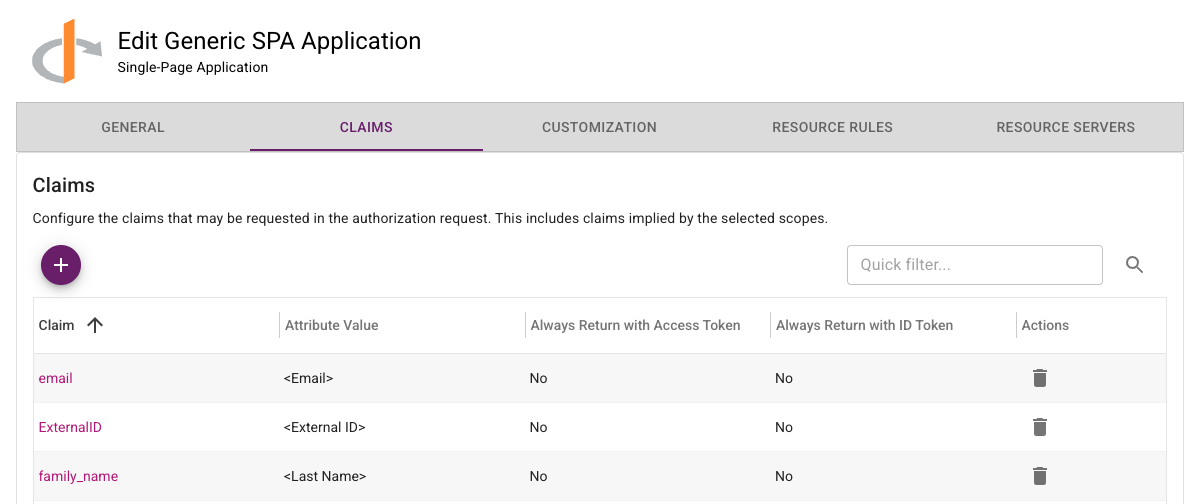
In-place upgrade of the ESG is only supported for versions 5.33 or later. Versions of ESG older than 5.33 are no longer supported. To upgrade versions of ESGs older than 5.33 to the new version, use the following procedure:

  1. Download the latest Gateway OVA or Hyper-V file from IDaaS and install on a new VM instance.
  2. Add a new Gateway instance to the existing Gateway in IDaaS.
  3. Register the new Gateway instance with IDaaS.
  4. Disable the old Gateway instance.
  5. Repeat these steps to replace all the Gateway instances that use older versions of the ESG.

Once the upgrade is complete, the Gateway instances corresponding to the old ESGs can be deleted from IDaaS and the VMs for those ESG instances can also be deleted.

Entrust Identity and Entrust Windows Desktop Soft Token Deprecation​

In the IDaaS 5.43 release, changes have been made that break the following operations:

  • Password reset in versions of Entrust Identity prior to 25.1.1. Customers using the SDKs are not impacted.
  • Soft Token online activation in versions of Entrust Windows Desktop Soft Token prior to 3.1.

Browser Deprecation​

Microsoft no longer supports Internet Explorer 11. Identity as a Service ceased support for Internet Explorer 11 after May 2023.

Release 5.42

· 14 min read

New in this release​

Application/Resource Rule Enhancements​

The Application and Resource Rule pages in the Administration Portal have been redesigned to improve usability and enhance functionality. Changes include:

  • The Application pages have been redesigned to include both the application configuration and resource rules. This means that the application and associated resource rules can be managed from the same page.
  • The Resource Rules page has been redesigned to use a new easy-to-use graphical editor. In this release, an option to switch to the old UI is provided but this will be removed in an upcoming release.
  • The graphical resource rule editor includes a test option to simulate the resource rule for different risk results.
  • When editing a resource rule, settings like Authentication Flows and Transaction Details can be managed from the resource rule page. For example, Authentication Flows can be created or modified from the Resource Rule UI.
  • A resource rule now has Access Filters that determine if a user can authenticate to an application using this resource rule. Supported Access Filters include:
    • Groups: A user can authenticate using this resource rule if they are a member of specified groups.
    • Authentication Context Reference: A user can authenticate using this resource rule if the authentication request from the client contains a specified authentication context reference value. This feature allows the client to influence how the user is authenticated. This is a new capability in this release.
    • Domain-based IDP: A user can authenticate using this resource rule if they belong to a specified Domain-based IDP. This is a new capability in this release.
  • The Application List page now includes search and filter capabilities to target which applications are shown.
  • The Application Create page has been redesigned to show all application templates. Search and filter capabilities are available to target which application templates are shown.
  • The Authorization Server page and corresponding menu have been renamed to Resource Server.
  • Many improvements have been made to the Application configuration pages, including: - The settings have been ordered to improve usability. - The settings now include more detailed descriptions. - Settings like the SAML Signing Certificate for SAML applications and the Gateway for RADIUS applications include an option to create a new Signing Certificate or Gateway. - Less frequently used settings have been moved to an advanced section of the page.

Enhanced Registration Configuration​

When configuring registration, an administrator can now specify the "Minimum Number of Second-factor Authenticators". This setting specifies the minimum number of authenticators the user must register. As an example, suppose an administrator wants their end users to register at least two of the authenticators, Entrust Soft Token, Passkey/FIDO2 or Face Biometric but wants the end user to decide which authenticators to register. This can be achieved by configuring these three authenticators as Optional during registration and then setting the Minimum Number of Second-factor Authenticators to 2.

Enhanced OTP Delivery Configuration​

When OTP authentication is enabled in an authentication flow in a resource rule, the allowed delivery types can be configured overriding the delivery types configured in the policy. This allows an administrator to configure different delivery types for different applications. For example, use Email delivery for one application and SMS delivery for another application.

Configuration to specify which delivery types are enabled and the default order of the delivery types is now set together instead of separate settings. This improves usability. The new UI is used in both the OTP policy and per application authentication flows.

Support Administrator Password Management for Directory Managed Passwords​

Administrators can now perform password reset and set passwords to require change on next use for users who have directory-managed passwords.

Allow Users to Specify Authenticator Order​

End users now have the option to specify their default authenticator order. This setting allows the end user to have a default authenticator that is different from the default specified in the resource rule. For example, suppose the resource rule lists authenticators in the order TOKENPUSH, TOKEN, FIDO. If the user has an Entrust Soft Token, they will always default to TOKENPUSH and if they want to use FIDO they will need to select an alternative authenticator. Allowing the end user to select their own authenticator order allows the end user to specify FIDO as their default authenticator. Now when the user authenticates, they will default to FIDO authentication.

Only authenticators allowed in the resource rule are used for authentication. The new setting only allows the end user to select a different order of allowed authenticators.

The following Magic Link enhancements have been made:

  • Magic Link is now supported as an authenticator for Portal, OIDC, SAML, and Authentication API applications.
  • Magic Link now supports Password Reset in addition to Registration.

The user experience of a Magic Link authentication is the following:

  • The user begins authentication from their client. The client waits for authentication to complete.
  • An email containing a Magic Link is sent to the end user.
  • The end user clicks on the Magic Link in their email.
  • The client completes authentication.

As part of these changes, the Magic Link policy page was moved from the Registration menu to the Authenticators menu.

Native Mobile Passkey Support​

IDaaS has been enhanced to support Passkey tokens implemented in mobile applications using Android and iOS Passkey SDKs. The Allowed Relying Party ID Hostnames configured in IDaaS Passkey/FIDO2 settings now supports mobile application values.

Improved Web Content Accessibility Guidelines (WCAG) Compliance​

Changes have been made to the IDaaS User Portal and the login pages to improve compliance with WCAG 2.2 at the AA level.

Support Import of Passwords from Entrust GetAccess​

Enhancements have been made to the IDaaS password APIs to support importing passwords from Entrust GetAccess.

Administration/User Portal Enhancements​

The following enhancements have been made to the Administration and User Portal UI:

  • An option to Show/Hide the authentication response has been added to the Login UI response fields for all the authenticators.
  • Leading and trailing whitespace is now trimmed from OTP responses in the Login UI. This addresses issues encountered when copying and pasting values from Emails or SMS messages.
  • Vertical tabs in pages in the administration portal are now left justified and sorted alphabetically. The following pages were changed: - Security -> Resource Servers - Resources -> Certificate Authorities - Configuration -> Knowledge-based Authentications - Policies -> Registration - Policies -> Authenticators - Policies -> Risk-based Authentications - Policies -> Soft Token SDK - Policies -> User Portal Portal
  • The administration portal menu search now supports keywords. For example, both otp and one time password will find the OTP settings page.

Fixed or changed in this release​

  1. The maximum length of a SCIM API key has been changed from 500 characters to 2000 characters. (39341)
  2. The IDaaS JWT grant type now supports ACR values. (38918)
  3. Updating a RADIUS application fails if the shared secret was not updated. (35469)
  4. Improve error message displayed for an invalid phone number entered when editing delivery contact. (37328)
  5. Include IP location information in push notifications sent for IDaaS authentication API applications including integrations like Entrust Desktop Credential Provider. (37677)
  6. Selecting an External Risk Engine in a resource rule is not saved. (37930)
  7. Deleting a claim value from an OIDC application returns success even though the claim is not deleted. (38430)
  8. Updating Passkey/FIDO2 registration level setting with an invalid value causes HTTP 500 error. (38735)
  9. Updating Passkey/FIDO2 settings with an invalid hostname value should not be allowed. (38736)
  10. Remove semicolon appearing on Entrust Soft Token SDK settings page. (38807)
  11. API to update Organization does not support removing description value. (38857)
  12. Administration role value selected by group policy is displayed with non-English locale. (38895)
  13. Improved documentation of required Entra ID Read/Write permissions. (38995)
  14. The org_id claim is not returned when using the OIDC JWT IDaaS grant type. (39008)
  15. OIDC Regenerate Client Secret dialog shows Shared Secret instead of Client Secret. (37274)
  16. Failed Passkey authentication is not generating an audit. (39164)
  17. OIDC Pre-authorized Code grant type should only be shown for OIDC4VC applications. (39260)
  18. When a managed tenant of a service provider is deleted, the associated Identity Provider application should be removed. (39274)
  19. Device verification fails in some scenarios when the JWT is expired. (39385)
  20. Support deflate encoding for SAML requests. (39501)
  21. The subject of a Service Provider IDP login audit should not be clickable. (39563)
  22. The resource name of a Service Provider IDP login audit should be Admin Portal not User Portal. (39588)
  23. IDaaS now rejects requests with an Origin value of null. (39607, 39614)
  24. The ACS and Logout URL hostnames of a SAML IDP are now added to the SAML CORs list. (39678)
  25. Refresh of tenant list in Service Provider portal generates browser console error. (38869)
  26. Header value returned in API rate limiting error contains value in milliseconds instead of seconds. (39960)

Changes to Identity as a Service (IDaaS) APIs​

Authentication API​

The following changes have been made to support Magic Link as a new authenticator in the Authentication API.

  • The value MAGICLINK can be specified where ever an authenticator type is specified.
  • The field magicLinkType has been added to the model AuthenticatedResponse returned from the challenge and authenticate APIs. It specifies the type of Magic Link being used for authentication.

The following changes have been made to existing models in the Authentication API:

  • The field requestAcrs has been added to UserAuthenticateParameters, UserAuthenticateQueryParameters, and UserChallengeParameters. This field allows an application to pass an ACR value to IDaaS that will be used when evaluating the ACR access filter of a resource rule.
  • The field authRequestKey has been added to UserChallengeParameters. This field allows the request key of an authentication request using the IDaaS JWT grant type. This allows authorization request parameters, such as the requested ACR, to be used when processing authentication challenge.
  • The field origin has been added to UserAuthenticateParameters. This value allows the client to specify the origin when performing Passkey/FIDO2 authentication which allows IDaaS to select the appropriate Passkey/FIDO2 tokens for authentication.

Administration API​

The following changes were made to the Administration API to manage Magic Links.

  • The method GET /api/web/v1/users/{userid}/magiclink (getMagicLinkUsingGET) has been added. This method returns the Magic Link for the specified user if one has been created.
  • The model MagicLink has been added. It contains information about an outstanding Magic Link.
  • the field type has been added to the model MagicLinkCreateParms. Since different types of Magic Links can be created, this field specifies the type of Magic Link being created.
  • The value MAGICLINK has been added to the list of second-factor authenticators and is included where ever it is specified such as the list of second-factor authenticators specified in an Authentication Flow.

The following changes were made to the Administration API to manage ACR values. An ACR object defines an Authentication Context Resource value that can be defined as an access filter in a resource rule.

  • The method GET /api/web/v1/acrs (getAcrsUsingGET) was added. This method returns all defined ACRs.
  • The method POST /api/web/v1/acrs (createAcrUsingPOST) was added. This method creates an ACR.
  • The method GET /api/web/v1/acrs/{id} (getAcrUsingGET) was added. This method returns a specific ACR.
  • The method DELETE /api/web/v1/acrs/{id} (removeAcrUsingDELETE) was added. This method removes a specific ACR.
  • The model Acr was added. This model includes information about an ACR returned from IDaaS.
  • The model AcrParms was added. This model includes information about an ACR passed to IDaaS when creating one.
  • The field acrFilter was added to the models ResourceRule and ResourceRuleParms. It specifies if the ACR filter is enabled and if so which ACRs it matches.
  • The field acrs was added to the models ResourceRule and ResourceRuleParms. If applicable it specifies the list of ACRs the ACR filter matches.
  • The field domainIdpFilter was added to the models ResourceRule and ResourceRuleParms. It specifies the Domain-based IDP filter is enabled and if so which IDPs it matches.
  • the field domainIdps was added to the models ResourceRule and ResourceRuleParms. If applicable, it specifies the list of IDPs the Domain-based IDP filter matches.

The following changes have been made to support changes to how OTP Delivery preferences are defined:

  • The model OTPPreferenceDetails has been added. The model defines information about an OTP Delivery type.
  • The field otpDeliveryPreference has been added to the models AuthenticationFlow, AuthenticationFlowParms, and OTPAuthenticatorSettings. This attribute defines an array of OTPPreferenceDetails that lists the type of OTP delivery types that can be used. The order of these values defines the preferred order of the delivery types.
  • The field overrideOtpContacts has been added to the models AuthenticationFlow and AuthenticationFlowParms. This attribute defines whether the OTP delivery configuration is defined in policy is used for this authentication flow or whether it is defined for this authentication flow.
  • The fields deliveryMethods, otpEmailDefaultDeliveryAttribute, otpSmsDefaultDeliveryAttribute, otpVoiceDefaultDeliveryAttribute, otpWechatDefaultDeliveryAttribute, and otpWhatsappDefaultDeliveryAttribute in the model OTPAuthenticatorSettings have been deprecated. They have been replaced by the field otpDeliveryPreference.

The following changes have been made to support configuration of allowed relying party IDs for the Native Mobile Passkey feature:

  • The method POST /api/web/v1/settings/fido/configuration/android (fetchAndroidAssociationFileUsingPOST) has been added. This method fetches the Android association file from a location specified by the relying party ID.
  • The method POST /api/web/v1/settings/fido/configuration/ios (fetchAppleAssociationFileUsingPOST) has been added. This method fetches the Apple association file from a location specified by the relying party ID.
  • The field androidOrigins has been added to FIDOAllowedRpId. This field specifies a list of FIDOAndroidOriginSettings defining a list of Android Relying Party IDs.
  • The field iosOrigins has been added to FIDOAllowedRpId. This field specifies a list of FIDOIosOriginSettings defining a list of iOS Relying Party IDs.
  • The models FIDOAndroidAssetLinks, FIDOAndroidAssetLinksTargets, FIDOAppleAppSiteAssociation, FIDOAppleAppSiteAssociationWebcredentials, and FIDOAssociationFileRequest have been added. These models defined arguments and return values for the methods described above.
  • The models FIDOAndroidOriginSettings and FIDOIosOriginSettings have been added. These models define fields in FIDOAllowedRpId described above.

The field userAuthenticatorPreference has been added to the model User. This value specifies the authenticator preferences for the user.

The value GETACCESS has been added to the field passwordFormat has been added to the model UserPasswordParms. This allows an application to import GETACCESS passwords using the IDaaS APIs.

Supported TLS Ciphers​

IDaaS supports the following TLS Ciphers:

TLSv1.3:

  • TLS_AKE_WITH_AES_128_GCM_SHA256 (ecdh_x25519)
  • TLS_AKE_WITH_AES_256_GCM_SHA384 (ecdh_x25519)
  • TLS_AKE_WITH_CHACHA20_POLY1305_SHA256 (ecdh_x25519)

TLSv1.2:

  • TLS_ECDHE_RSA_WITH_AES_128_GCM_SHA256 (ecdh_x25519)
  • TLS_ECDHE_RSA_WITH_AES_256_GCM_SHA384 (ecdh_x25519)
  • TLS_ECDHE_RSA_WITH_CHACHA20_POLY1305_SHA256 (ecdh_x25519)
  • TLS_ECDHE_RSA_WITH_AES_256_CBC_SHA384 (ecdh_x25519)
  • TLS_ECDHE_RSA_WITH_AES_128_CBC_SHA256 (ecdh_x25519)

Clients should stop using the following TLS Ciphers. Support for them will be removed in a future release.

TLSv1.2:

  • TLS_ECDHE_RSA_WITH_AES_128_CBC_SHA256 (ecdh_x25519)
  • TLS_ECDHE_RSA_WITH_AES_256_CBC_SHA384 (ecdh_x25519)

Enterprise Service Gateway Deprecation​

Entrust will only support the last four releases of the Enterprise Service Gateway (the current version 5.42 and the three previous releases 5.39, 5.40, and 5.41). Entrust recommends that customers always upgrade their Enterprise Service Gateway to the latest release because each release contains security updates to the Enterprise Service Gateway Operating System.

NOTE: In the 5.43 release, changes are planned that will break versions of ESG older than 5.33.
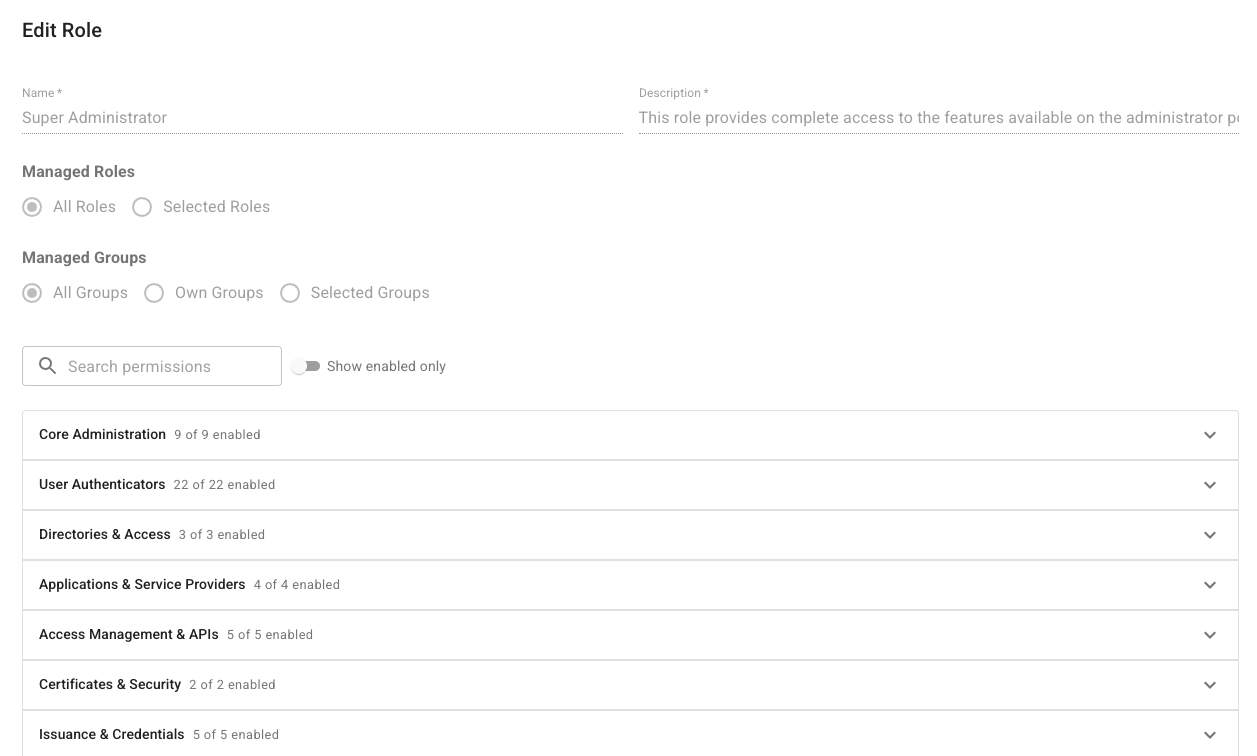
In-place upgrade of the ESG is only supported for versions 5.33 or later. Versions of ESG older than 5.33 are no longer supported. To upgrade versions of ESGs older than 5.33 to the new version, use the following procedure:

  1. Download the latest Gateway OVA or Hyper-V file from IDaaS and install on a new VM instance.
  2. Add a new Gateway instance to the existing Gateway in IDaaS.
  3. Register the new Gateway instance with IDaaS.
  4. Disable the old Gateway instance.
  5. Repeat these steps to replace all the Gateway instances that use older versions of the ESG.

Once the upgrade is complete, the Gateway instances corresponding to the old ESGs can be deleted from IDaaS and the VMs for those ESG instances can also be deleted.

Entrust Identity and Entrust Windows Desktop Soft Token Deprecation​

In the IDaaS 5.43 release, changes are planned that will break the following operations:

  • Password reset in versions of Entrust Identity prior to 25.1.1. Customers using the SDKs are not impacted.
  • Soft Token online activation in versions of Entrust Windows Desktop Soft Token prior to 3.1

Browser Deprecation​

Microsoft no longer supports Internet Explorer 11. Identity as a Service ceased support for Internet Explorer 11 after May 2023.

Release 5.41

· 6 min read

New in this release​

Verifiable Credentials​

This release of IDaaS includes preliminary support for the issuance and presentation (or verification) of verifiable credentials. IDaaS supports verifiable credentials using the W3C VC format. IDaaS also supports OpenID for Verifiable Credential Issuance (OID4VCI) and OpenID for Verifiable Presentations (OID4VP) for integrating VC issuance and presentation with wallets. IDaaS supports the following standards:

Face Biometric Registration Improvements​

When registering a Face Biometric authenticator, the IDaaS user's first and last name are provided to the Onfido registration workflow to compare the user's name in IDaaS to the user's name as it appears on their government ID. Previously, the user's default firstName and lastName attributes were used. The IDaaS user attributes used to provide first name and last name values can now be configured in the Face Biometric policy. This feature allows IDaaS to store both a user's legal name and their preferred name. When configured, the user's preferred name is used in most cases and the user's legal name is used for Face Biometric registration.

Certificate Expiry Notification Email Improvements​

The certificate expiry notification email now includes the hostname of the IDaaS account. This provides useful information for administrators who are managing multiple IDaaS accounts.

Portal UI Error Reporting​

Errors that cause the IDaaS Portal and Authentication UI to crash are now logged to the IDaaS service to facilitate debugging.

Fixed or changed in this release​

  1. Audits for failed device verification are missing. (39166)
  2. Allow Enterprise Service Gateway and Microsoft CA proxy to be downloaded from accounts with a vanity URL. (37855)
  3. Token activation with Identity Verification option should include the Face Biometric serial number in its audit. (38779)
  4. The Identity as a Service Integration ForgeRock application has been removed from the list of applications that can be created. The integration was no longer supported by ForgeRock. The ForgeRock OIDC application template is still available. (38633)
  5. For Service Provider accounts, the default Customer Support Agent role now includes the Edit Tenants permission. This allows support agents to unlock tenants. (38472)
  6. Editing the Message of the Day in the Administration portal generates a stack trace in the browser console. (38903)
  7. Editing the User Verification Message in the Administration portal generates a stack trace in the browser console. (38757)
  8. On the Group List page of the Administration portal, selecting the checkbox for all groups no longer selects the "All Users" group. The "All Users" group is a virtual group for which actions like delete groups do not apply. (38804)
  9. When activating an Entrust Soft Token, do not display the Identity Verified option if it is not available. (38777)
  10. Authenticate API user query can fail if the user password last changed time is not set. (39181)
  11. Updating a user from any page other than the first page of the list results in a page not found error. (38454)
  12. For OTP voice delivery, English was used for the Thai and Turkish locales. (38874)
  13. Push notifications not sent for an Entrust Soft Token activated offline. (39218)
  14. Activation of a Face Biometric on the Entrust Identity application is not working if registration started from the mobile web browser. An activation QR code was displayed instead of an activation link. (37756)
  15. The error message displayed when a compromised password is used has been changed to "This password has been found in a compromised password list from a 3rd-party website. To ensure security, its use is restricted." (39147)
  16. A password cannot be assigned to a user if they do not have an email address. Now the option to send the new password by email is disabled. (38483)
  17. Broken hyperlinks in the documentation have been fixed. (38482)
  18. Fix errors in the Administration Guide "Integrate Microsoft Entra ID with Identity as a Service" section. (38913)
  19. For accounts that do not have WeChat/WhatsApp OTP delivery enabled, some WeChat/WhatsApp options are visible including the admin portal menu search. (38810)
  20. Improve audits when WhatsApp credentials are updated. (38837)
  21. User certificate authentication was only shown for users that had smart credentials supporting push authentication. This did not include users who have YubiKey smart credentials. (38750)

Changes to Identity as a Service APIs​

Authentication API​

There are no changes in the Authentication API in this release.

Administration API​

There are no changes in the Administration API in this release.

Supported TLS Ciphers​

IDaaS supports the following TLS Ciphers:

TLSv1.3:

  • TLS_AKE_WITH_AES_128_GCM_SHA256 (ecdh_x25519)
  • TLS_AKE_WITH_AES_256_GCM_SHA384 (ecdh_x25519)
  • TLS_AKE_WITH_CHACHA20_POLY1305_SHA256 (ecdh_x25519)

TSv1.2:

  • TLS_ECDHE_RSA_WITH_AES_128_GCM_SHA256 (ecdh_x25519)
  • TLS_ECDHE_RSA_WITH_AES_256_GCM_SHA384 (ecdh_x25519)
  • TLS_ECDHE_RSA_WITH_CHACHA20_POLY1305_SHA256 (ecdh_x25519)
  • TLS_ECDHE_RSA_WITH_AES_256_CBC_SHA384 (ecdh_x25519)
  • TLS_ECDHE_RSA_WITH_AES_128_CBC_SHA256 (ecdh_x25519)

Clients should stop using the following TLS Ciphers. Support for them will be removed in a future release.

TLSv1.2:

  • TLS_ECDHE_RSA_WITH_AES_128_CBC_SHA256 (ecdh_x25519)
  • TLS_ECDHE_RSA_WITH_AES_256_CBC_SHA384 (ecdh_x25519)

Enterprise Service Gateway Deprecation​

Entrust will only support the last four releases of the Enterprise Service Gateway (the current version 5.41 and the three previous releases 5.38, 5.39, and 5.40). Entrust recommends that customers always upgrade their Enterprise Service Gateway to the latest release because each release contains security updates to the Enterprise Service Gateway Operating System.

In-place upgrade of the ESG is only supported for versions 5.33 or later. Versions of ESG older than 5.33 are no longer supported. To upgrade versions of ESGs older than 5.33 to the new version, use the following procedure:

  1. Download the latest Gateway OVA or Hyper-V file from IDaaS and install on a new VM instance.
  2. Add a new Gateway instance to the existing Gateway in IDaaS.
  3. Register the new Gateway instance with IDaaS.
  4. Disable the old Gateway instance.
  5. Repeat these steps to replace all the Gateway instances that use older versions of the ESG.

Once the upgrade is complete, the Gateway instances corresponding to the old ESGs can be deleted from IDaaS and the VMs for those ESG instances can also be deleted.

Browser Deprecation​

Microsoft no longer supports Internet Explorer 11. Identity as a Service ceased support for Internet Explorer 11 after May 2023.