Search the IDaaS UI
When you sign in to IDaaS as an administrator, a search bar appears in the banner. Use it to find menu pages.
Only administrators can use search, and the results are limited to the menu items allowed by the assigned administrator role. For example, users with the Auditor role can search only the menu items available to auditors.
For more information on roles, see Create, assign, and manage roles.
Use the banner search bar
- Log in to your IDaaS account with your administrator role.
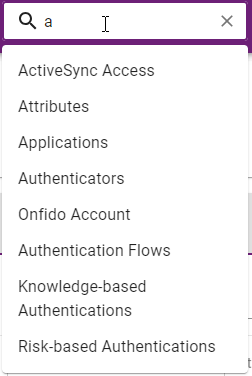
- In the search bar start typing the menu item you are trying to find. As you start to type, a list of matching options appears.

- Select the desired menu item. The applicable menu page appears.
Search limitations and tips
-
Returned searches are limited to features available for your IDaaS administrator role.
-
You cannot search for the top-level menu name, for example, Configuration. You can only search for sub-menus.
-
The search must match to a menu page. If you search for User, as shown in the figure above, the menu pages that include the word User in the title menu appear in the list.
-
You can enter a letter in the search bar to display a list of all pages that include a word that starts with that letter, as shown in this example using the letter a.